
Do you need a CDN? When it speeds you up, and when it's just another bill
A CDN works wonders for static files. For pages rendered from the database on every request, it usually does very little.
Founder & CTO, Parslinks
A small ticketing startup sells seats for indie concerts. Most weeks are quiet. Then a popular band announces a surprise show, the link goes viral, and the event page takes six seconds to load. In the incident channel, someone writes the obvious thing: "We need a CDN."
Maybe. A CDN is a network of servers close to your users that keep copies of your responses. The key word is copies. A CDN can only speed up something it's allowed to copy and hand to the next person.
What a CDN actually does
When a visitor in Lisbon requests your logo, the nearest CDN node answers instead of your origin server in Frankfurt. If that node doesn't have the file yet, it fetches it once and keeps it for everyone who asks next.
That gives you two benefits:
- Lower latency for users far from your origin.
- Less load on your origin, because most static requests never reach it.
What benefits, and what doesn't
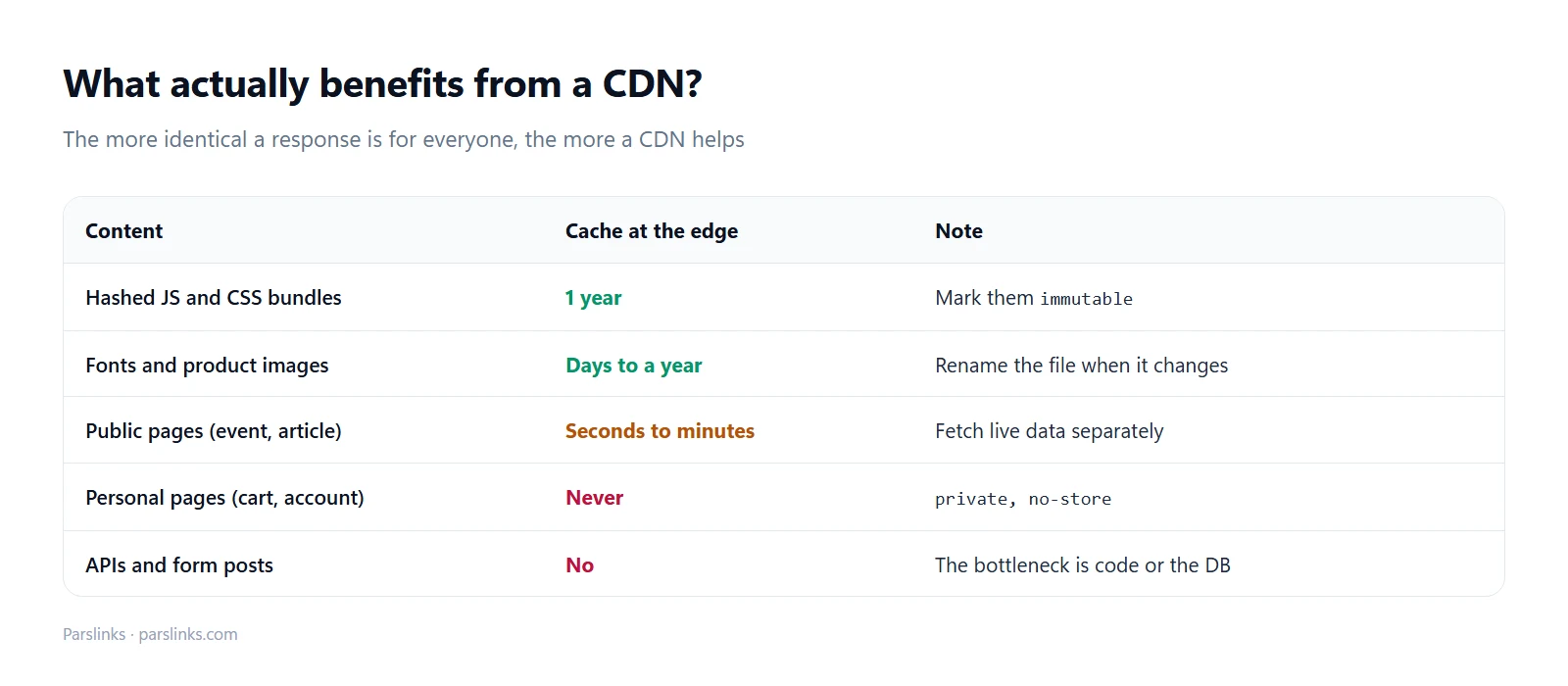
Static assets: the ideal case
Hashed JS and CSS bundles (app.3f9a1c.js), fonts and product images are identical for everyone and never change under the same name. Serve them with Cache-Control: public, max-age=31536000, immutable and a CDN can hold them for a year. We cover the headers in detail in Cache-Control, file by file.
Dynamic HTML: carefully
A "My tickets" page differs per user. Cache it by mistake and one customer sees another customer's order, which is the worst bug you can ship. Personalized pages must be private, no-store, and the CDN should simply pass them through.
Public pages like the event page sit in between. You can cache them for seconds or minutes as long as you fetch live data like remaining seats separately.
APIs: usually no
Checkout, payments and any POST request can't be cached. For those, a CDN is just one more hop. If your API is slow, the bottleneck is a query or your code, not the distance to the user.
Where are your users?
If your origin and your users are on the same continent, the latency a CDN saves is modest; a few tens of milliseconds. The bigger win is offloading your server. If your audience is global, or your origin is far from most users, edge locations make a visible difference. Just remember a CDN is also a dependency: if its region has an outage, your static assets go with it.
Check three things before you buy
- Measure TTFB for your main page from a few locations. If it's above 800 ms, your server is the problem and a CDN will only hide it. Our TTFB guide helps you find the bottleneck.
- Look at the share of static traffic. If most of your bytes are images and JavaScript, a CDN pays off quickly.
- Audit your cache headers. Without correct headers, a CDN caches nothing, or caches the wrong things.
The ticketing team ended up putting only images and static assets behind the CDN, caching the event page for 30 seconds and loading seat availability with a separate request. Origin load dropped by half during the next big drop, and nobody saw anyone else's tickets.
Frequently asked questions
Join the discussion
No comments yet. Be the first to share your thoughts.
Related posts
- Guides
Cache-Control headers for a modern front end: a recipe for every kind of file
Cache-Control is one header with a few words, but each word changes how browsers, CDNs and servers behave. This post explains each directive simply, suggests a safe recipe for every kind of response, and shows two costly mistakes.
- Platform
Hosting inside Iran or abroad? A decision for web apps that needs real numbers
For a WordPress blog, the difference between domestic and foreign hosting is a few milliseconds. For a shop or app whose revenue depends on users in Iran, this choice decides what happens during an international outage, how you pay, and how safe your account is.
- Guides
High TTFB in Next.js: finding the bottleneck, layer by layer
TTFB is the time from a user's request to the first byte of the response, and in Next.js it's made of network, middleware, data fetching and rendering. This post shows how to measure each layer separately and fix the most common culprits with code examples.