
High TTFB in Next.js: finding the bottleneck, layer by layer
When a page is slow to start loading, there's usually one big culprit, not ten small ones. Find it first.
Co-founder, Parslinks · Team, marketing & infrastructure
The product page of a leather bag and shoe shop in Tabriz scores poorly in PageSpeed, and the first warning is "Reduce initial server response time": a TTFB of about 670 ms. The team goes for the familiar fixes first: compressing images and shrinking the font. The number doesn't budge, because none of that happens before the first byte.
TTFB is entirely server and network. To bring it down, you need to know exactly where those 670 ms are spent.
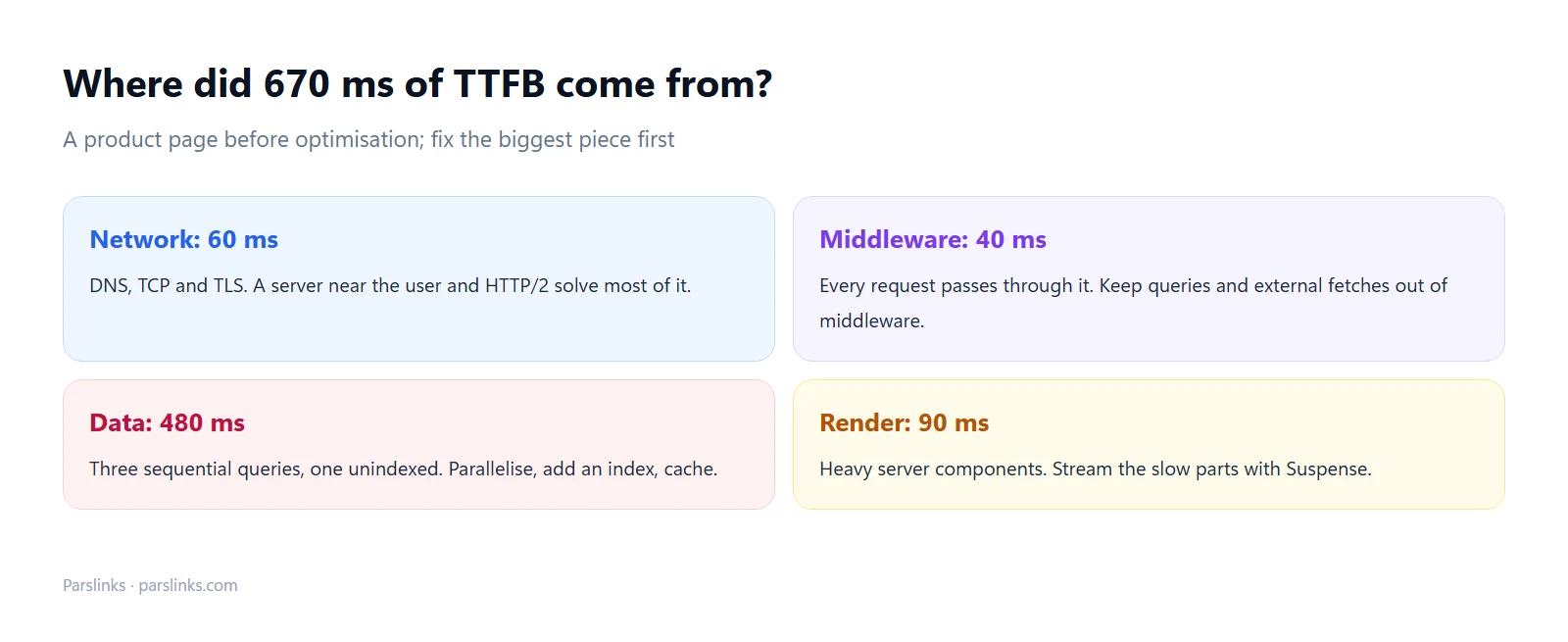
The pieces of TTFB
Step one: measure, don't guess
The Server-Timing header is the simplest tool: the browser shows it in the Network tab under Timing, with no extra service needed.
For pages (Server Components) you can log the same numbers. The only goal is to know which layer has the biggest share.
Culprit one: data fetching
At the Tabriz shop, 480 of the 670 ms was data. Three common problems:
Sequential queries that could run in parallel. The product, reviews and related products don't depend on each other, but were fetched with three awaits in a row:
A query without an index. "Related products" filtered on a category column with no index. EXPLAIN ANALYZE in PostgreSQL showed a full table scan; one index took it from 180 ms to 8 ms.
Data that could have been cached. Product details change a few times a day, not every second. With tagged caching, the page is served from cache and rebuilt only when the product is edited.
Culprit two: middleware
Middleware runs before every request, even static-file requests if the matcher isn't set right. One fetch to an auth service in middleware adds that latency to every page. Keep middleware to light work (redirects, language detection, checking a cookie exists) and write a precise matcher.
Culprit three: the network
If your users are in Iran and your server is in Europe, the TLS connection round trips alone can cost 200 ms before a single line of code runs. No code optimisation makes up for that. We cover it in hosting inside Iran or abroad.
Culprit four: rendering
The slow part of a page (reviews, say) shouldn't hold up the whole page. With Suspense, the page shell and core product info are sent immediately and reviews stream in afterwards. TTFB becomes as fast as the quickest essential part, not the slowest part.
The result
By running queries in parallel, adding one index and caching the product page, the Tabriz shop brought TTFB from 670 ms to about 150 ms. None of the changes was more than a few lines of code. The hard part was finding the right place.
Frequently asked questions
Join the discussion
No comments yet. Be the first to share your thoughts.
Related posts
- Deploy
Deploying Next.js to production: what SSG, ISR and SSR each need from your infrastructure
Each page's rendering mode decides what your server has to do. This post covers what SSG, ISR, SSR and PPR need from your infrastructure, how standalone output works, and what breaks once the app runs on more than one instance.
- Guides
Monitoring and logs for a small team: four numbers that are enough to start
The first person to notice your site is down shouldn't be a customer. This post explains the four basic signals (latency, traffic, error rate and saturation), suggests sensible alert thresholds for each, and shows how to write logs that help on incident day.
- Platform
Hosting inside Iran or abroad? A decision for web apps that needs real numbers
For a WordPress blog, the difference between domestic and foreign hosting is a few milliseconds. For a shop or app whose revenue depends on users in Iran, this choice decides what happens during an international outage, how you pay, and how safe your account is.