
Deploying Next.js to production: what SSG, ISR and SSR each need from your infrastructure
The project that runs perfectly under next dev needs things in production that the getting-started docs never mention.
The first time a Next.js project hurts in production, the code is rarely the culprit. The product page still shows the old price after you changed it. A form built on a Server Action errors for a few minutes after every deploy. An API URL you changed in an environment variable still has the old value in the browser.
All of these share a root cause: Next.js expects different things from your infrastructure depending on how each page is rendered. This post spells those expectations out.
Where and when is the HTML built?
The key question for any page is the moment its final HTML is produced. The answer decides how much work the server does, where the cache has to live, and what your response time depends on.
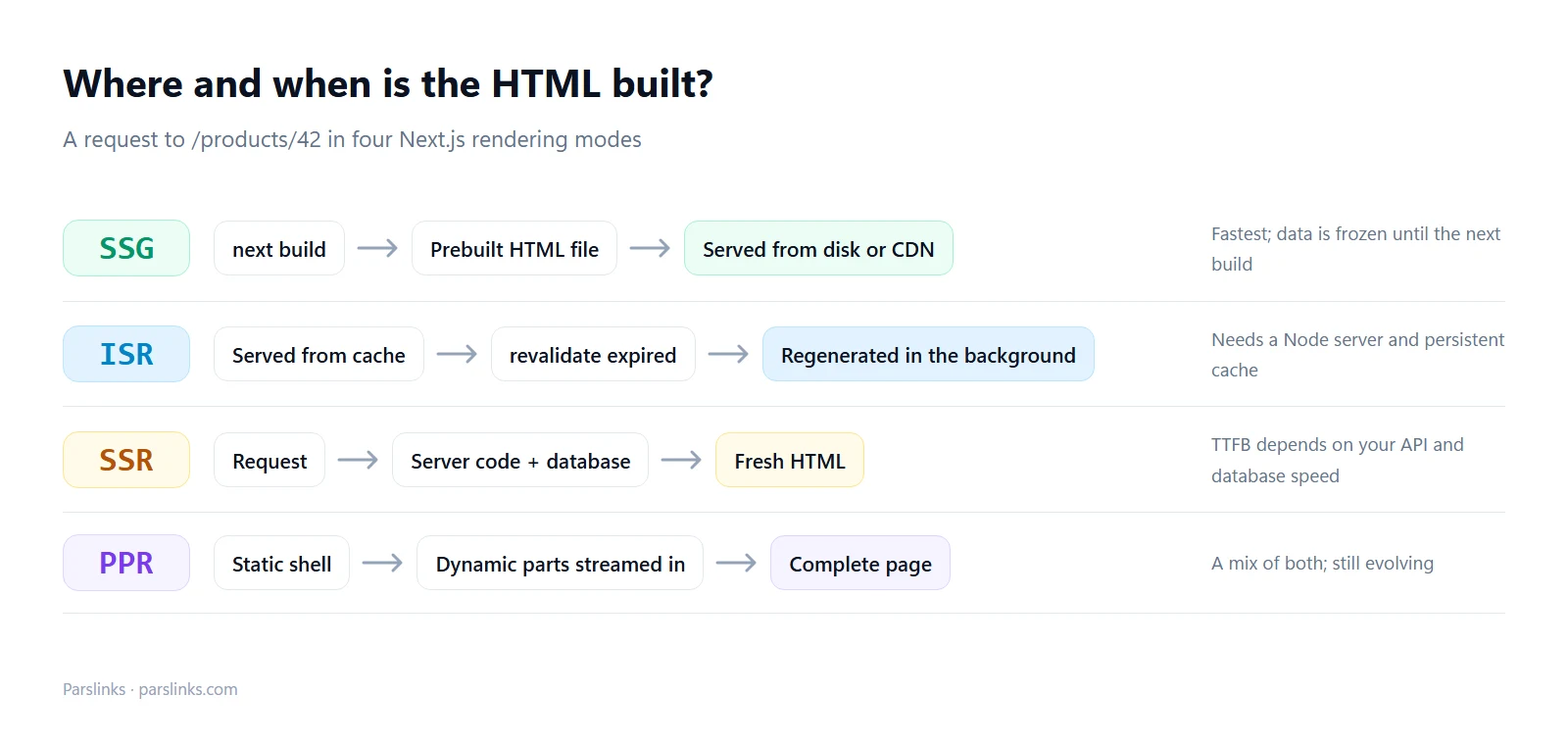
SSG (static generation): the page is built once, during next build. After that the server just hands out a ready-made file. It's the fastest and cheapest mode, but the data is frozen until the next build.
ISR (incremental regeneration): the page is served from cache, and when the revalidate time passes or revalidatePath / revalidateTag is called, a fresh version is built in the background. This needs a live Node server and a cache that survives between requests.
SSR (server rendering): on every request, server code runs, fetches data and builds HTML. The data is always fresh, but time to first byte (TTFB) is tied directly to your database and API speed.
PPR (partial prerendering): a static shell of the page is sent immediately and dynamic parts stream in. In recent Next.js versions this model has grown into Cache Components and is still changing, so read the docs for the exact version you run before relying on it in production.
What each mode needs from your infrastructure
| Mode | Needs a Node server? | Persistent cache | Database access at request time | Good for |
|---|---|---|---|---|
| SSG | No (with output: "export") | Not needed | Only at build time | Landing pages, docs, a rarely changing blog |
| ISR | Yes | Yes, shared if you run several instances | When regenerating | Product catalogues, CMS content |
| SSR | Yes | Optional | Every request | Dashboards, personalised pages |
| PPR | Yes | Yes, for the static part | For dynamic parts | Pages that are mostly static with a little dynamic |
Keep in mind that a real project is usually a mix. As soon as a single page uses ISR or SSR, you need a Node server, and a purely static deployment is off the table.
Standalone output: the leanest way to run
With output: "standalone", Next.js collects only the files and dependencies actually needed at runtime into .next/standalone, along with a server.js. The result runs without the full node_modules and is ideal for containers and platforms.
import type { NextConfig } from "next";

const config: NextConfig = {
  output: "standalone",
  // One id per deployment, so browser and server versions can't silently drift apart
  deploymentId: process.env.DEPLOYMENT_ID,
};

export default config;
Two things almost everyone runs into once:
- The
publicand.next/staticfolders are not copied into the standalone output by default. If you build your own image, put them next toserver.jsyourself, or the site comes up with no CSS or images. server.jslistens on whatever address is inHOSTNAME. Inside a container, set it to0.0.0.0so it's reachable from outside.
If you do need a Dockerfile, a minimal multi-stage version looks like this:
FROM node:22-alpine AS build
WORKDIR /app
COPY package.json package-lock.json ./
RUN npm ci
COPY . .
RUN npm run build

FROM node:22-alpine AS run
WORKDIR /app
ENV NODE_ENV=production HOSTNAME=0.0.0.0 PORT=3000
COPY --from=build /app/.next/standalone ./
COPY --from=build /app/.next/static ./.next/static
COPY --from=build /app/public ./public
USER node
EXPOSE 3000
CMD ["node", "server.js"]
On Parslinks most projects don't need this file at all: the Next.js preset defines the install, build and start commands. Add a Dockerfile when you need a specific system package.
When the app runs on more than one instance
With one instance, most things just work. Problems start when two or more instances serve traffic at once, or when the old and new versions are alive side by side for a few seconds.
| Symptom | Cause | Fix |
|---|---|---|
| Two users see two different versions of the same ISR page | Each instance has its own filesystem cache | A shared cacheHandler, for example backed by Redis |
| Server Actions fail for a while after every deploy | The action encryption key changes with each build | A fixed value for NEXT_SERVER_ACTIONS_ENCRYPTION_KEY |
| A user with the page already open gets errors when navigating | Browser has old code, server has new code | Set deploymentId so Next.js detects the mismatch and does a full reload |
| An uploaded file is sometimes there, sometimes not | It was saved to one instance's disk | Store uploads in object storage |
The NEXT_PUBLIC_ trap
Any variable starting with NEXT_PUBLIC_ is written straight into the browser JavaScript at build time. After the build, changing it on the server has no effect on code that already shipped to browsers.
This matters even more when your platform, like Parslinks, promotes the same preview artifact to production. That's deliberate: it guarantees that what you approved is what goes live. But it also means any NEXT_PUBLIC_ value baked into the preview build reaches production too.
Variables without the prefix, like DATABASE_URL, are read only on the server and can change at runtime. That's why one build can serve a preview and production connected to two different databases.
Image optimisation and health checks
On a Node server, next/image resizes images on request and caches the result. Check two things: that external image hosts are listed in images.remotePatterns, and that if you see build or runtime errors about sharp, you add it explicitly to your dependencies.
So the platform knows the app is actually ready for traffic, add a simple health route that doesn't depend on any external service:
export const dynamic = "force-dynamic";

export function GET() {
  return Response.json({ ok: true, version: process.env.DEPLOYMENT_ID ?? "dev" });
}
From preview to production on Parslinks
Connect the repo and pick the Next.js preset. Every branch you push gets its own build and preview URL, with build logs and status right there. When a version is approved, that same artifact is promoted to production, and if you spot a problem after release, you roll back to the previous version without rebuilding.
Before the first deploy, pin down four things so builds are reproducible everywhere: the Node version (for example in the engines field of package.json), your package manager's lockfile, the environment variables for each environment, and which pages need runtime data.
The one-paragraph summary
If every page is static, you don't need a server at all. The moment ISR or SSR shows up, you need a Node server, ideally running lean with output: "standalone". And before you scale to multiple instances, share three things: the cache, the Server Actions key, and where files are stored.
Frequently asked questions
Join the discussion
No comments yet. Be the first to share your thoughts.
Related posts
November 24, 2026
A Vercel alternative for teams in Iran: what it actually has to replace
Foreign-card payments, the risk of a suspended account and unreliable access to vercel.app push teams in Iran to look elsewhere. But renting a server and running next start covers only a small part of what Vercel did. Here is the full list, and how the alternatives compare.
November 24, 2026
Zero-downtime deployments in practice: rolling, blue/green, and promoting the same artifact
A restart is the simplest way to deploy, and the seconds the service is down are the seconds orders fail. This post lists where downtime really comes from, compares three common release strategies, and shows how to change your database without an outage.
November 24, 2026
Environment variables and secrets: from a .env on your laptop to production
Why does a key you marked "hidden" in your dashboard show up in your site's JavaScript? The difference between build-time and runtime variables, separate values for each environment, and what to do in the first minutes after a key leaks.