
Rate limits and bot defense: from the login form to your public API
A large share of any popular site's traffic isn't human. The question is which bots to let in.
Founder & CTO, Parslinks
A job board notices its servers are busier at 3 a.m. than at noon. The logs show a handful of IPs requesting dozens of listing pages per second: a competitor is copying every job post. At the same time, the login form sees thousands of failed attempts per night using leaked email-and-password pairs from other sites.
Neither is a sophisticated attack. A sensible rate-limiting layer stops most of both.
What rate limiting means
"Each key may make at most N requests per time window." The key is often the IP, but for signed-in users the user ID is better, and for a login form the username being tried.
Two common algorithms
Fixed window: a counter that resets every minute. Simple, but a client can send twice the limit by bursting at the end of one window and the start of the next.
Token bucket: each key has a bucket that refills at a steady rate; each request takes a token. It allows short bursts (a user quickly opening a few pages) while capping the average. A better default for most APIs.
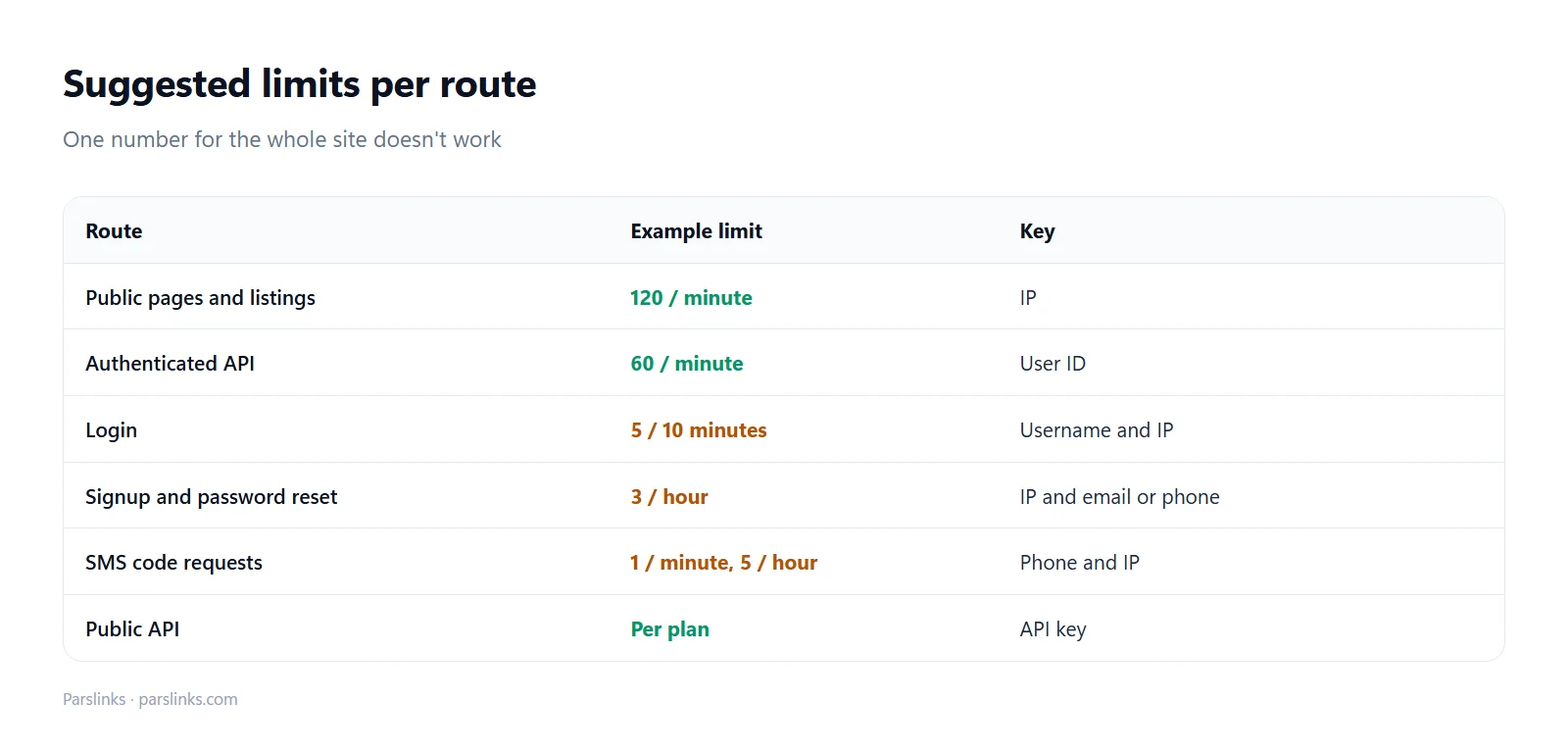
Set limits per route
One number for the whole site doesn't work. Listing pages can have generous limits. Login, signup, password reset and SMS code requests need much tighter ones; no real person submits a password twenty times a minute.
Answer with 429
When a limit is hit, return 429 Too Many Requests with a Retry-After header saying when to try again. Well-behaved clients respect it.
Where to enforce it
The earlier, the better. A limit at the edge or reverse proxy rejects traffic before it touches your app or database. A limit inside the app is more precise because it knows the user. Combining both is common: a coarse per-IP limit at the edge, and fine-grained per-user, per-route limits in the app.
With multiple instances, counters must be shared, usually in Redis. Otherwise each instance enforces its own limit and the real limit is multiplied.
Bots you want
Don't block search engine crawlers. Verify them with reverse DNS rather than the User-Agent, which anyone can fake. Write a sensible robots.txt, knowing that bad bots ignore it.
The outcome
The job board added a coarse per-IP limit at the edge, a per-account limit on the "view employer contact" endpoint and a cap of five login attempts per ten minutes per email. Overnight load fell by 70%, and credential stuffing stopped getting anywhere.
Frequently asked questions
Join the discussion
No comments yet. Be the first to share your thoughts.
Related posts
- Guides
Yalda night sales and Nowruz traffic: getting your site ready for the hour everyone shows up
The sale SMS goes out at 9pm, and in the first five minutes you get ten times a normal day's traffic. This post covers what breaks first under that load, how to load-test properly, and what to do from two weeks before until the morning after.
- Guides
Automatic SSL: issuing, renewing, and the TLS errors that still scare users away
Let's Encrypt certificates are free and valid for 90 days, which means four chances a year to forget. This post explains how automatic issuing and renewal work, what common browser errors actually mean, and how to find and fix each one fast.
- Guides
Monitoring and logs for a small team: four numbers that are enough to start
The first person to notice your site is down shouldn't be a customer. This post explains the four basic signals (latency, traffic, error rate and saturation), suggests sensible alert thresholds for each, and shows how to write logs that help on incident day.