
Caching with Redis: fast responses without stale data
Caching is easy. Knowing when to throw the cache away is the hard part.
Co-founder & Head of Development and Communications, Parslinks
A recipe site has a page listing every recipe with filters for cuisine, cooking time and diet. Each visit runs a heavy query with half a dozen joins. On a normal day it's fine. On the Sunday before a big holiday, it takes two seconds and the database CPU sits at 90%.
The team adds Redis and response time drops to 40 ms. A week later an editor fixes a typo in a popular recipe title, and for the next hour readers still see the old one. The cache worked perfectly. Nobody had planned how to refresh it.
Three common patterns
Cache-aside (the default). The app checks Redis first. On a miss, it reads the database and stores the result. Simple, and only data that's actually read gets cached.
Write-through. Every database write also updates the cache. The cache is always fresh, at the cost of slightly slower writes.
Expiry only. Cache with a short TTL and accept a few seconds of staleness. Perfect for view counters or a "trending" list.
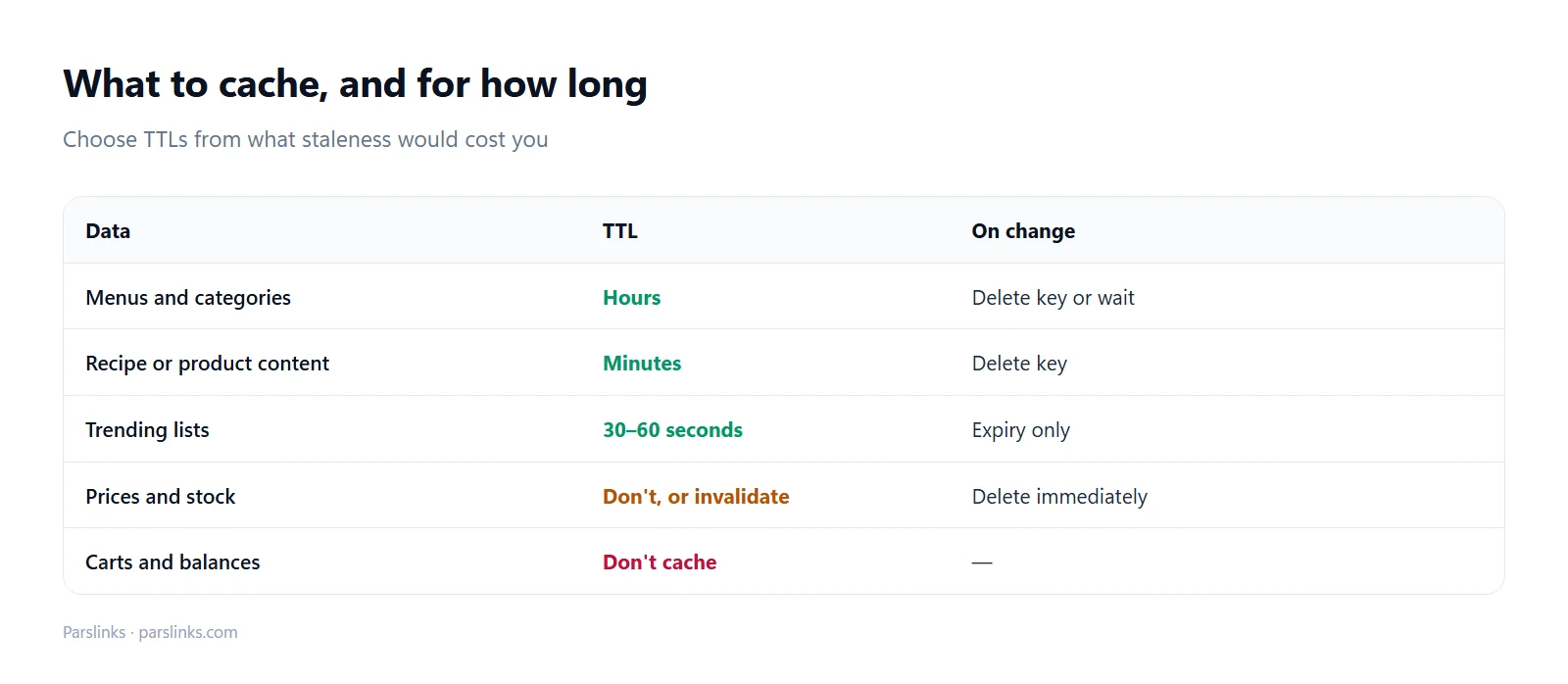
Pick TTLs from business rules, not guesses
Ask one question: what happens if a user sees this data a little out of date?
- Navigation menus and category lists: hours of staleness is fine.
- Recipe or product content: a few minutes.
- Prices and stock: don't cache, or invalidate on every change.
- Carts and account balances: don't cache.
Invalidate on write
When something changes in the admin panel, the same code path should delete the matching key. That's much easier when keys are predictable:
The v1 suffix is a cheap trick: when the shape of the cached data changes, bump it to v2 and every old entry is ignored automatically.
Cache stampedes
Say your homepage is cached and expires at exactly 9:00, the moment a newsletter lands in 50,000 inboxes. A thousand concurrent requests find the cache empty and all hit the database at once. Two simple defenses:
- Jittered TTLs: instead of a fixed 300 seconds, use something between 270 and 330 so keys don't all expire together.
- A short lock: let only the first request rebuild the value; the rest wait a few milliseconds or get the previous value.
The outcome
The recipe site now caches list pages for five minutes and deletes a recipe's key whenever an editor saves. On the next holiday weekend, the database saw about 30 queries per second instead of 400. If you're preparing for a traffic peak, our sales-rush checklist covers the rest.
Frequently asked questions
Join the discussion
No comments yet. Be the first to share your thoughts.
Related posts
- Guides
Cache-Control headers for a modern front end: a recipe for every kind of file
Cache-Control is one header with a few words, but each word changes how browsers, CDNs and servers behave. This post explains each directive simply, suggests a safe recipe for every kind of response, and shows two costly mistakes.
- Guides
Yalda night sales and Nowruz traffic: getting your site ready for the hour everyone shows up
The sale SMS goes out at 9pm, and in the first five minutes you get ten times a normal day's traffic. This post covers what breaks first under that load, how to load-test properly, and what to do from two weeks before until the morning after.
- Deploy
Laravel on a cloud platform: queues, cron and storage without a hand-built server
A real Laravel app isn't just the web: there's a queue worker for SMS and email, a scheduler for nightly jobs, and a storage folder for files. This post shows how to run those three parts separately and reliably on a cloud platform, without losing queued jobs during deploys.