
CI/CD for small teams: GitHub Actions, GitLab CI, or deploying straight from Git?
CI doesn't have to do everything. Separate testing from deployment and both get simpler.
Co-founder, Parslinks · Team, marketing & infrastructure
At an online-learning startup, the deploy.yml in GitHub Actions is over 200 lines. It runs tests, builds the project, SSHes into the server, copies files with rsync, runs migrations and restarts the service. The production server's SSH key and the database password sit in the repo's secrets. The person who wrote it left six months ago. Every time something in that chain breaks, the whole team spends an afternoon reading Actions logs.
The problem isn't GitHub Actions. It's one file doing two completely different jobs.
CI and CD are two separate jobs
CI (continuous integration) asks: "Is this change sound?" Lint, tests, type checks, a trial build. The answer is green or red.
CD (continuous delivery/deployment) asks: "How do we get this version to users?" Building the artifact, previews, promotion to production, rollback.
When both live in one file, CI gets access to production keys, and any change to the test process carries deploy risk too.
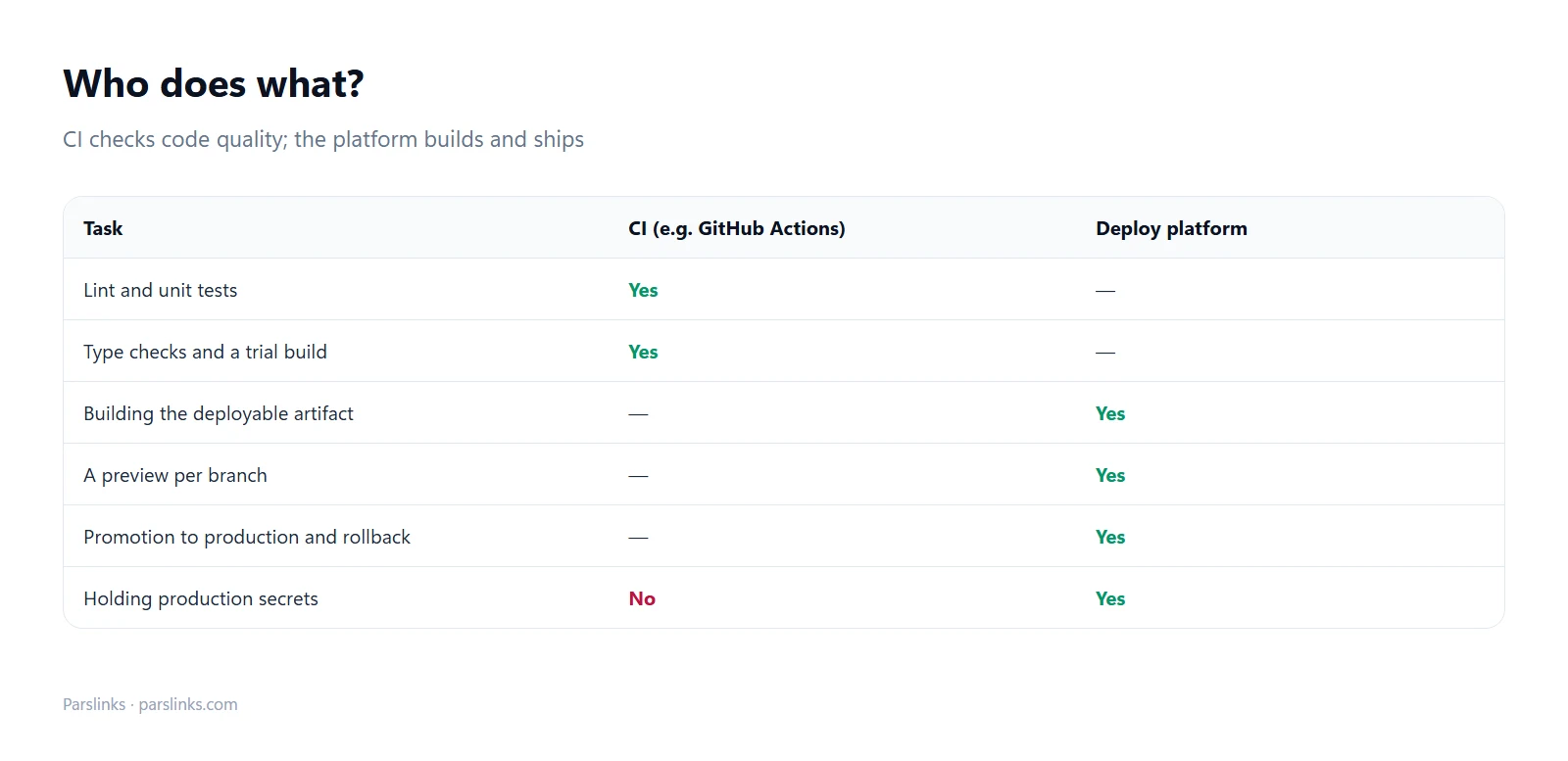
A workflow that works today
CI only runs checks. It needs no production keys:
The platform handles deployment: every push to any branch builds a preview, and merging into main builds production. Connect two things:
- A GitHub branch rule: merging into
mainis only allowed when CI is green (branch protection, "Require status checks"). - Review on the preview: put the preview link in the PR so someone has seen the real thing before merging.
The result: no code reaches production without green tests and a human look, and your YAML is twenty lines, not two hundred.
GitLab CI
Same logic if your repo is on GitLab or a self-hosted GitLab:
Where should migrations run?
Not in CI. CI shouldn't have access to the production database. Migrations are part of deployment and should run where production variables live: as a step before traffic switches to the new version.
Where to start
If you have no CI today: create a workflow with lint and tests and turn on branch protection. If you have a 200-line CI: split the deploy part out, remove SSH keys and production passwords from the repo's secrets (and rotate them), and hand deployment to the platform.
Frequently asked questions
Join the discussion
No comments yet. Be the first to share your thoughts.
Related posts
- Product
A preview for every branch: reviewing work without queueing for shared staging
One staging server for the whole team means only one change can be reviewed at a time, and nobody knows whose change a bug belongs to. This post shows how a preview per branch changes the workflow for designers, product managers and testers, and what to set up right from the start.
- Product
Rollback in 30 seconds: why going back shouldn't depend on a rebuild
Most teams roll back like this: revert, push, wait for the build. Using a real incident, this post shows why that's slow at the worst possible moment, how rolling back to the previous artifact works, and what no rollback can undo.
- Guides
Environment variables and secrets: from a .env on your laptop to production
Why does a key you marked "hidden" in your dashboard show up in your site's JavaScript? The difference between build-time and runtime variables, separate values for each environment, and what to do in the first minutes after a key leaks.