
Environment variables and secrets: from a .env on your laptop to production
Most leaked keys aren't hacked. They leak through one wrong prefix, or one file that should never have been committed.
One of our users woke up to an email from their payment provider: "Suspicious activity on your API key." Nobody had hacked their code, and no server password had leaked. The payment key had been defined with a NEXT_PUBLIC_ prefix because without it "it didn't work". Anyone who opened the checkout page's source could read the full key.
This post is about exactly those details: when a variable is actually read, why each environment needs its own values, and, if a key does leak, the order in which to clean it up. The examples use Next.js, but the same logic applies to Vite, Nuxt, Django and Laravel.
First: what an environment variable is not
Environment variables are for settings that differ between environments: the database address, service keys, the site URL. They're not for application logic. If you've defined ten variables to switch one feature on, you probably want a config file or a feature-flag system, not more variables.
Second rule: the code shouldn't run quietly without them. If DATABASE_URL is empty, the app should stop at startup with a clear message, not fall back to a default and crash ten minutes later with a vague error.
Build time or runtime? The distinction that matters most
Most confusion comes from here. Some variables are read at build time, and their values are written directly into the JavaScript files sent to the browser. Others are read at runtime, on the server, and never leave it.
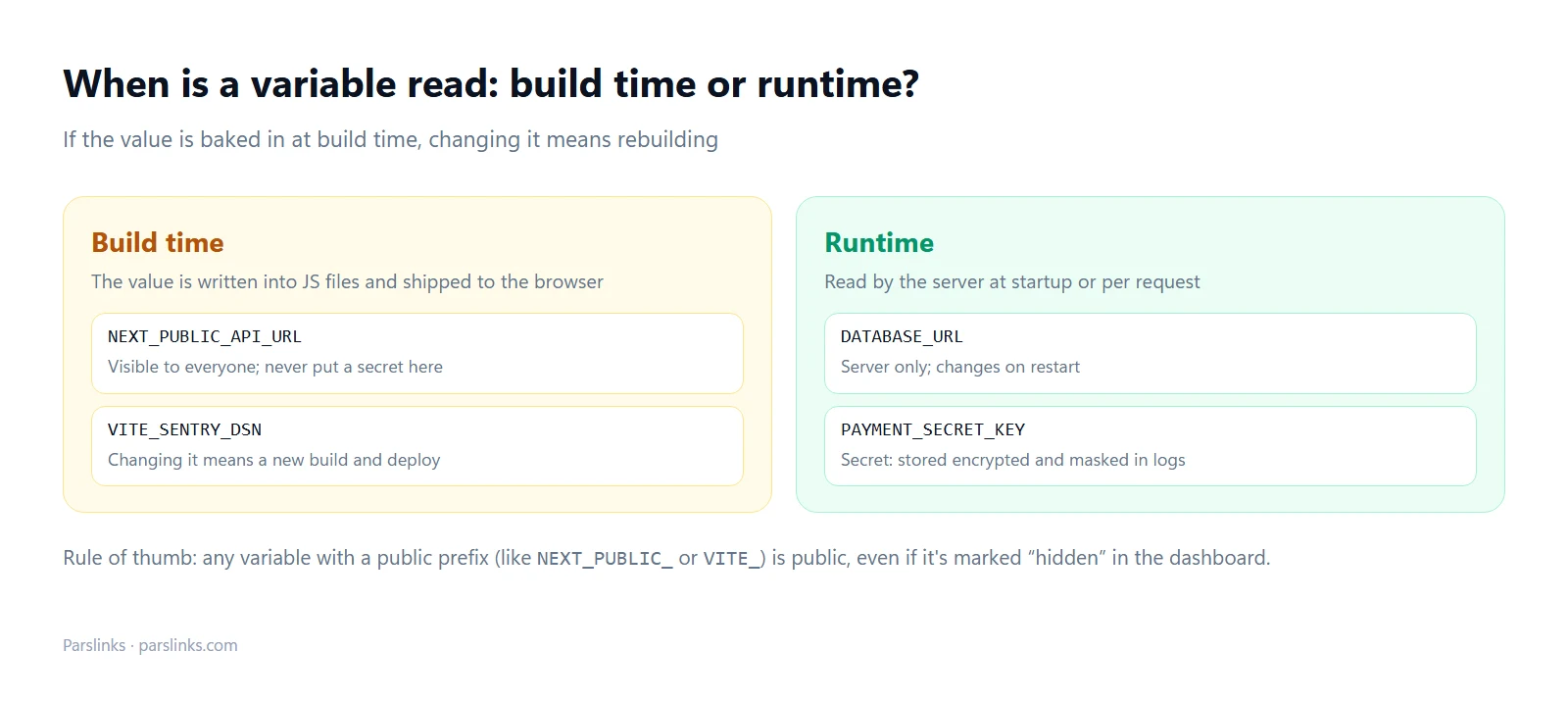
In Next.js, any variable that starts with NEXT_PUBLIC_ is substituted at build time. After the build, process.env.NEXT_PUBLIC_API_URL in your code has become a fixed string. Two direct consequences:
- Anyone can see it. It doesn't matter that you ticked "hidden" in the deploy dashboard; the value is in a JS file.
- Changing it needs a rebuild. Change the API URL in the dashboard and only restart, and browsers still get the old one.
Variables without the prefix are only available in server-side code: Route Handlers, Server Components, Server Actions. If a key is needed for something the browser does, the right move is usually to route the request through your server, not to send the key to the browser.
// The key is only read on the server; the browser only sees the result
const secret = process.env.PAYMENT_SECRET_KEY;

export async function POST(req: Request) {
  if (!secret) {
    return Response.json({ error: "payment_not_configured" }, { status: 503 });
  }
  const { amount } = await req.json();
  const res = await fetch("https://api.payment.example/v1/sessions", {
    method: "POST",
    headers: { Authorization: `Bearer ${secret}`, "Content-Type": "application/json" },
    body: JSON.stringify({ amount }),
  });
  return Response.json(await res.json(), { status: res.status });
}A quick decision table
If you're not sure where a value belongs, this helps.
| Kind of value | Example | Where to define it | Reaches the browser? |
|---|---|---|---|
| Public URL | Site URL, public API URL | Variable with a public prefix | Yes, that's fine |
| Public service identifier | Payment publishable key, error-tracking DSN | Variable with a public prefix | Yes; it's designed for that |
| Connection string | DATABASE_URL, REDIS_URL | Runtime variable | Never |
| Secret key | Payment secret key, API token, JWT signing key | Encrypted secret on the platform | Never |
| Behaviour setting | Whether a feature is on | Config file or feature flag | Depends |
Each environment, its own values
The second common mistake is one .env file passed around between local, preview and production. You've probably seen the result: someone tests the sign-up form on a preview and the welcome email goes to a real customer, or a test payment comes out of a real account.
Variable names should be identical in every environment so the code doesn't change; it's the values that differ.
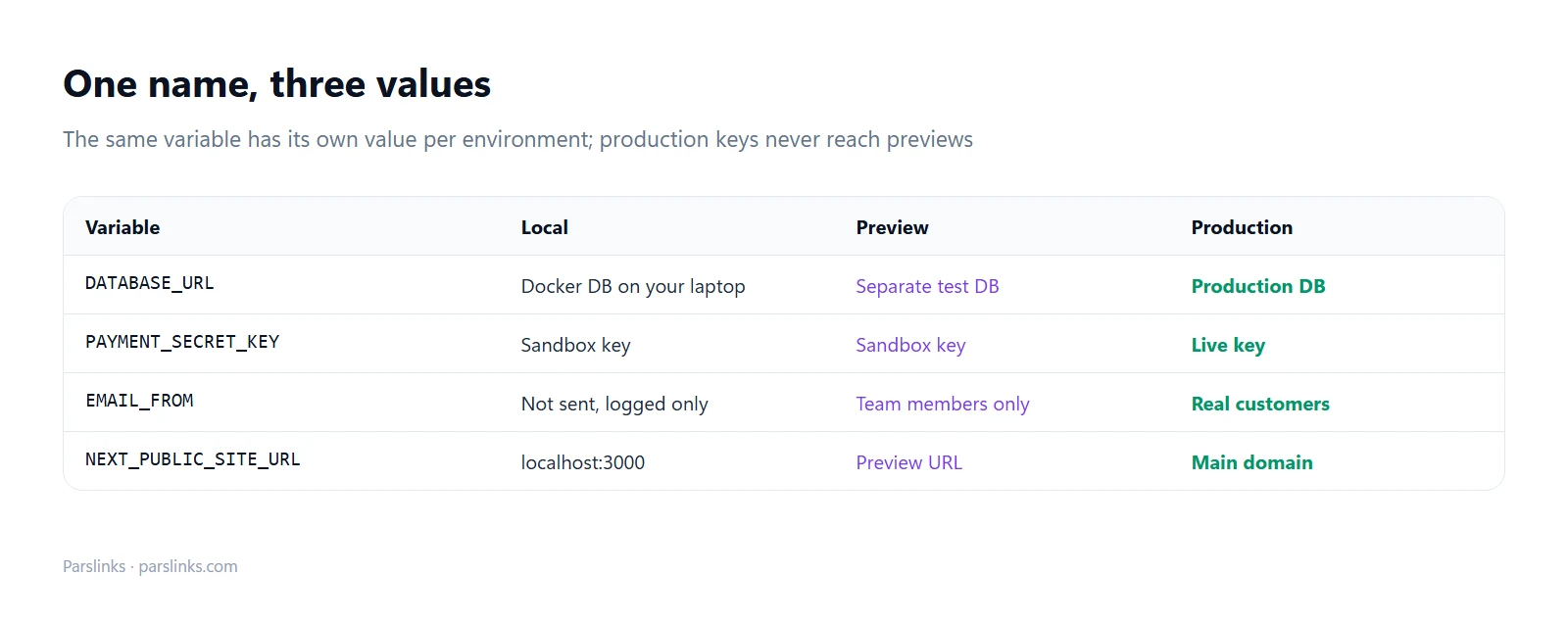
On Parslinks you define variables separately for each environment (development, preview, production), and every deployment only receives its own environment's values. Branch previews have no access to the live payment key, even if someone changed the payment code in their branch.
On your laptop, keep a .env.local, and commit a .env.example with no real values so a new teammate knows what's needed:
# Public site URL (reaches the browser)
NEXT_PUBLIC_SITE_URL=http://localhost:3000

# Server only
DATABASE_URL=postgres://app:app@localhost:5432/app
PAYMENT_SECRET_KEY=
EMAIL_FROM=[email protected].env
.env.local
.env.*.local
# .env.example is deliberately not here; it should be committedValidate at startup
A small file that reads and checks every variable in one place has two benefits: a missing variable shows up in the first second, and the full list of what the app needs lives in one place. With zod it's a few lines:
import "server-only";
import { z } from "zod";

const schema = z.object({
  DATABASE_URL: z.string().url(),
  PAYMENT_SECRET_KEY: z.string().min(20),
  EMAIL_FROM: z.string().email(),
});

// If anything is missing, the app stops right here with a clear message
export const env = schema.parse(process.env);
The import "server-only" line makes sure that if someone imports this file into a client component by mistake, the build fails instead of quietly bundling your variables for the browser.
When a key leaks
It doesn't matter whether it came from a commit, a screenshot in a group chat, or the wrong prefix. The order matters, because instinct goes straight to erasing the evidence, and that wastes the time that counts.
| Order | Action | Why this order |
|---|---|---|
| 1 | Create a new key and set it on the platform | The app must work with the new key before you revoke the old one |
| 2 | Redeploy (or restart, for a runtime variable) | So no instance is left running with the old key |
| 3 | Revoke the old key at the source service | From this moment the leak is harmless |
| 4 | Check the key's usage logs at the source | Find out what happened between the leak and the revocation |
| 5 | Finally, scrub it from Git history | Worth doing, but after revocation; copies were already taken |
A quick check for your own project
If you do one thing today: search the codebase for NEXT_PUBLIC_ (or VITE_ and PUBLIC_), and look carefully at every match followed by a word like SECRET, KEY or TOKEN. Most of the time it's public on purpose and harmless. Occasionally it's the key you need to rotate today.
Frequently asked questions
Join the discussion
No comments yet. Be the first to share your thoughts.
Related posts
November 24, 2026
Deploying Next.js to production: what SSG, ISR and SSR each need from your infrastructure
Each page's rendering mode decides what your server has to do. This post covers what SSG, ISR, SSR and PPR need from your infrastructure, how standalone output works, and what breaks once the app runs on more than one instance.
November 24, 2026
Zero-downtime deployments in practice: rolling, blue/green, and promoting the same artifact
A restart is the simplest way to deploy, and the seconds the service is down are the seconds orders fail. This post lists where downtime really comes from, compares three common release strategies, and shows how to change your database without an outage.
November 24, 2026
PaaS or a VPS? The real DevOps hours behind a small team's server
The VPS price is on the invoice. The hours spent on patches, SSL renewals, deploy scripts and midnight restarts are not. This post counts those hours, compares them with a platform, and is honest about when a VPS is still the better call.