
Database backups: a backup you can't restore isn't a backup
Everyone takes backups. Very few teams test whether they actually come back.
Founder & CTO, Parslinks
A two-person SaaS that runs payroll for small clinics ships a migration on Friday afternoon. It's meant to drop a temporary column. It drops a table instead.
"It's fine, we have nightly backups." They do. The latest one is 19 hours old. Restoring it on a spare server takes three and a half hours, and then fails halfway because the spare runs a different PostgreSQL major version. The weekend is gone.
That Friday they learned that a backup isn't a file. It's a process.
Two numbers to decide before picking any tool
RPO (recovery point objective): if everything disappeared right now, how much recent data could you afford to lose? Five minutes? A day? For payroll, losing a day means re-entering hours that clinics already submitted.
RTO (recovery time objective): how long can the service be down before it's back? An hour? A day?
These two numbers decide what kind of backup you need and how much it's worth spending.
The 3-2-1 rule
Three copies of your data, on two different kinds of storage, with at least one off-site. A backup on the database server's own disk dies with that disk. A backup in the same data center dies with that data center. Off-site means a different provider or region, ideally one you can still reach if your main provider has a bad day.
Logical or physical?
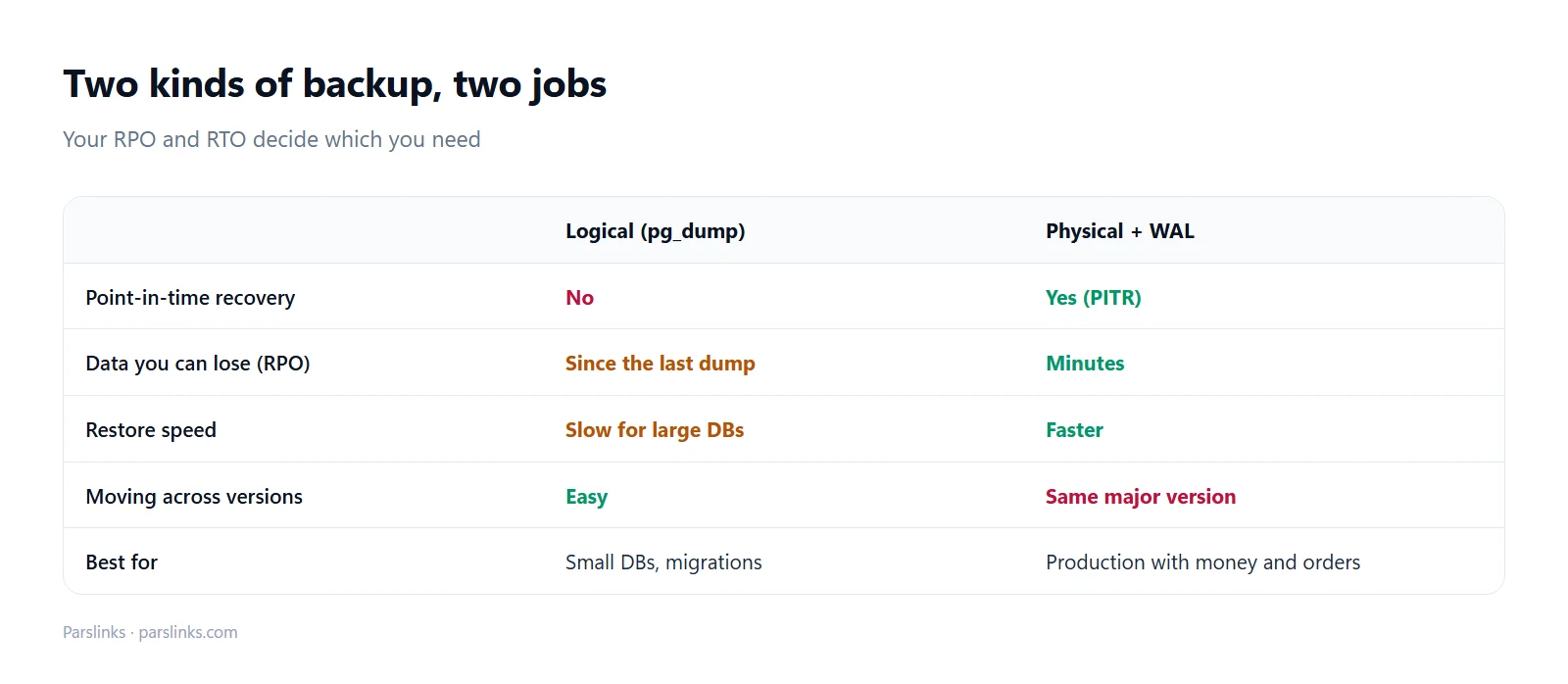
Logical (pg_dump, mysqldump): SQL or a compressed archive. Portable across versions and fine for databases up to a few tens of gigabytes. But restores are slow, and you only get the moment the dump was taken.
Physical with WAL archiving: a copy of the data files plus the transaction log. Restores are faster, and you can recover to an exact moment, for example 15:41, one minute before the bad migration. That's point-in-time recovery (PITR), and it's exactly what the payroll team needed.
Restore drills: the step everyone skips
Once a month, and after every database upgrade:
- Restore the latest backup onto a separate server.
- Time it. That's your real RTO, not the number you assumed.
- Run a few sanity queries: yesterday's record count, the newest signup. Do they look right?
- Fix anything that went wrong the same day.
After that weekend, the payroll team turned on WAL archiving, added an off-site copy with a second provider and put a restore drill on the first Monday of each month. RPO went from 24 hours to five minutes, and RTO went from "no idea" to 40 minutes.
Factor those numbers into your uptime commitments. An SLA without a restore plan is just a number on a page.
Frequently asked questions
Join the discussion
No comments yet. Be the first to share your thoughts.
Related posts
- Deploy
Deploying Django with PostgreSQL, without wrestling Gunicorn and Nginx
Turn DEBUG off and the CSS disappears, ALLOWED_HOSTS returns 400, and migrations have to be run by hand after each deploy. This post prepares a Django project step by step for deployment on a platform: settings, static files, the database and Celery.
- Platform
What does 99.9% uptime mean? SLAs in minutes, and what the contract doesn't tell you
Providers talk about 99.9% and 99.99% uptime, but few people work out how many minutes each nine is, what doesn't count against it, and what the compensation really is. This post unpacks the numbers and shows what your app's real uptime is made of.
- Guides
International internet outages: keeping your site and API up for users inside Iran
The server is inside Iran, yet on outage day the login page stays blank and the pay button does nothing. This post shows how to find hidden foreign dependencies, which to remove, and how to build the rest so that if they fail, only they fail.