
Deploying Django with PostgreSQL, without wrestling Gunicorn and Nginx
Most of Django's production problems aren't Django's. They come from static files, migrations and settings that only exist on one server.
Co-founder, Parslinks · Team, marketing & infrastructure
A student team in Mashhad built a booking system for their faculty's study hall in Django. On their laptops, everything was perfect. On day one on a server, they set DEBUG = False and the page loaded with no CSS. After fixing that, they got "Bad Request (400)" because the domain wasn't in ALLOWED_HOSTS. A week later, after adding a field to a model, the site crashed with "column does not exist", because nobody remembered to run migrate on the server.
None of these are Django bugs. They're the places where a project moves from "on my laptop" to "on a server".
The map: where each piece goes
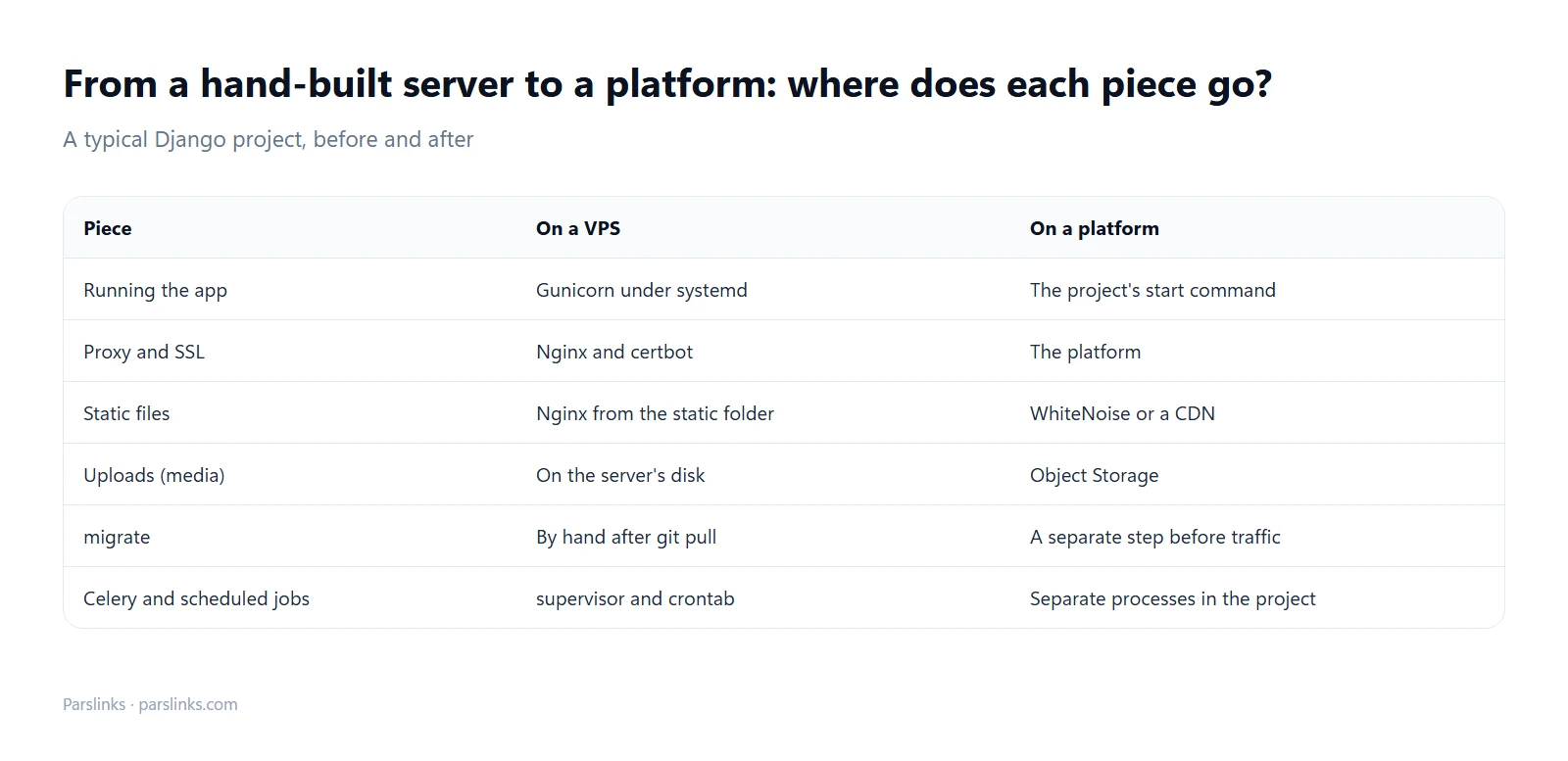
1. Settings from environment variables
One settings.py for every environment, with values read from the environment. SECRET_KEY and the database password never live in code:
2. Gunicorn instead of runserver
runserver is for development. In production, Gunicorn runs the app. The project's start command on a platform looks something like this:
Tune the worker count to the instance's resources; the common rule is two per core plus one. You don't need to put Nginx in front yourself; the proxy and SSL belong to the platform.
3. Static files with WhiteNoise
On a hand-built server, Nginx served static files from STATIC_ROOT. On a platform, WhiteNoise is the simplest route: the app serves compressed, hash-named static files with long cache headers itself. collectstatic runs during the build.
The last line matters: files users upload (media) are different from static files and shouldn't stay on the app's disk. With django-storages, send them to S3-compatible object storage. We explain why in where user uploads should live.
4. Migrations, before traffic
Run python manage.py migrate as a separate step before traffic switches to the new version, not inside Gunicorn's start command; otherwise with three instances the migration runs three times at once. And write migrations compatible with the previous version: add new fields as nullable or with a default, and leave dropping fields to the next release.
5. Celery and scheduled jobs
If you hand SMS sending or report building to Celery, the worker and beat are two processes separate from the web, with the same code and variables:
| Process | Command | Instances |
|---|---|---|
| Web | gunicorn config.wsgi:application ... | As traffic requires |
| Celery worker | celery -A config worker -l info | As job volume requires |
| Celery beat | celery -A config beat -l info | Exactly one |
Pre-release checklist
Django has a tool for this. Before your first deploy, run it with production settings:
Go through its warnings (secure cookies, HSTS, SSL settings) one by one. Most are a single line of config and prevent common security issues.
Frequently asked questions
Join the discussion
No comments yet. Be the first to share your thoughts.
Related posts
- Deploy
Laravel on a cloud platform: queues, cron and storage without a hand-built server
A real Laravel app isn't just the web: there's a queue worker for SMS and email, a scheduler for nightly jobs, and a storage folder for files. This post shows how to run those three parts separately and reliably on a cloud platform, without losing queued jobs during deploys.
- Guides
Environment variables and secrets: from a .env on your laptop to production
Why does a key you marked "hidden" in your dashboard show up in your site's JavaScript? The difference between build-time and runtime variables, separate values for each environment, and what to do in the first minutes after a key leaks.
- Guides
Where should user uploads live? Object storage vs. the container disk
On a traditional server, uploads sit on the same disk as the code. On platforms and containers, every deploy is a fresh container and each instance has its own disk. This post explains why files go missing, how object storage solves it, and how to migrate the files you already have.