
Connection pooling: why your database falls over at 100 concurrent users
"Too many connections" rarely means you need bigger hardware. It means nobody is managing connections.
Co-founder & Head of Development and Communications, Parslinks
A fantasy-football app gets its biggest traffic of the week in the 30 minutes before the Saturday deadline. One season, the team scales from 2 to 8 instances to handle the rush. Within minutes, everything starts failing with FATAL: sorry, too many clients already.
Database CPU: 30%. Memory: plenty. Adding instances made it worse.
Connections are expensive
In PostgreSQL, each connection is a separate server process using several megabytes of memory. The default max_connections is usually 100. Now do the math:
- Each app instance opens a pool of 15 connections.
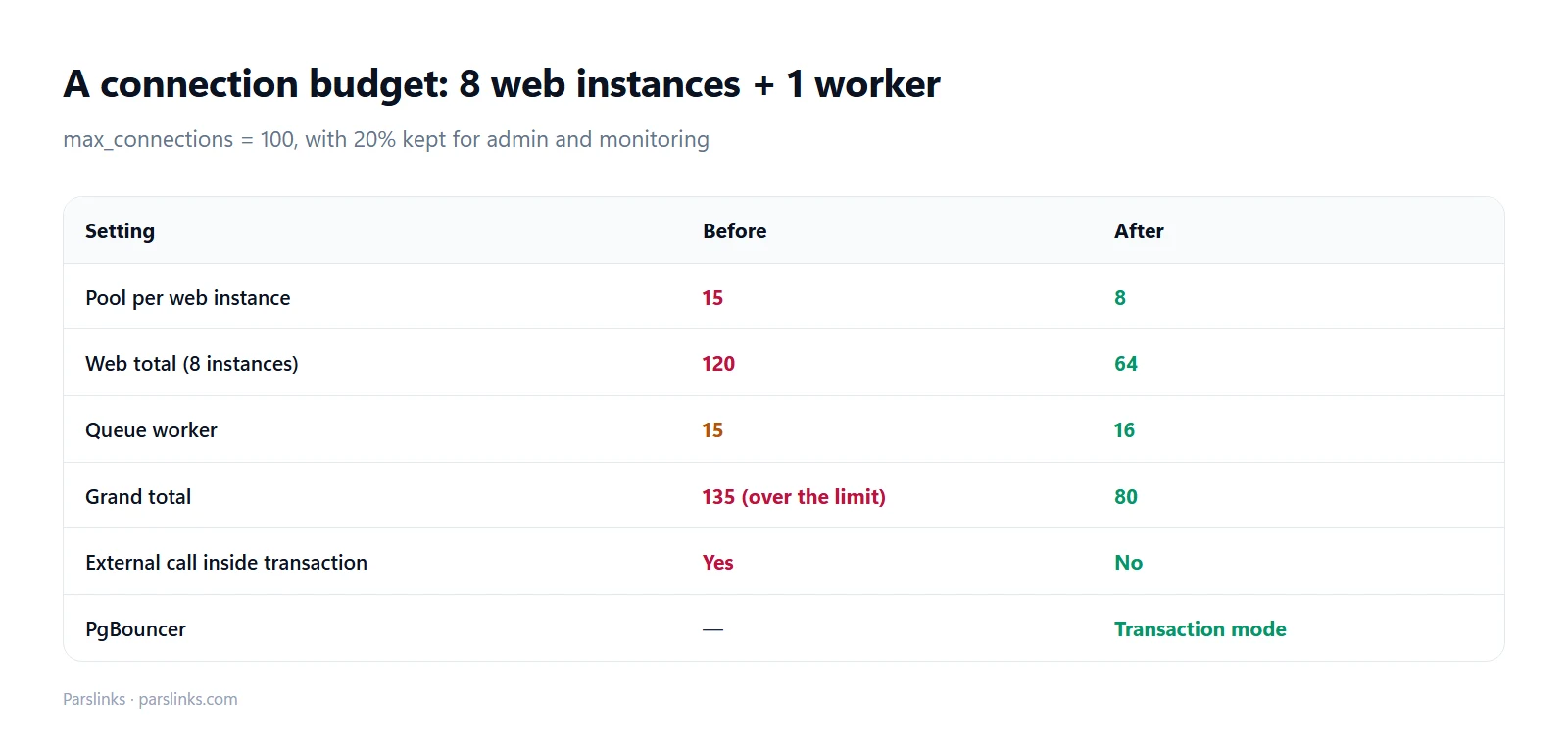
- 8 instances × 15 = 120 connections.
- Plus the background worker, the scheduler and the monitoring agent.
You're over the limit before a single slow query runs.
What a pool does
Instead of opening and closing a connection for each request, the app keeps a few connections open and lends them out. When a request finishes, its connection goes back to the pool. That removes the cost of connecting and caps the total.
Size the pool, don't guess
A rule of thumb that holds up well:
Sum of all pools across all processes ≤ 80% of max_connections
The remaining 20% is headroom for migrations, an admin console and monitoring. Then split that budget. With 8 web instances and one worker sharing 80 connections, that's roughly 8 per instance and 16 for the worker.
Eight feels small. But most queries in a web app finish in a few milliseconds, so eight connections can serve hundreds of requests per second, as long as no request holds a connection while waiting on something else.
When you need PgBouncer
When instance counts are large or change constantly (autoscaling, or serverless functions where every invocation wants its own connection), manual math stops working. PgBouncer sits between your app and the database, accepts hundreds of lightweight client connections and multiplexes them onto a few dozen real ones.
In transaction mode, a server connection is assigned to a client only for the duration of one transaction. It gives the biggest savings, but session-level features such as some prepared statements or SET commands need care. If you use an ORM, check its notes on PgBouncer compatibility.
The outcome
The team cut each instance's pool from 15 to 8, moved the push-notification call out of the transaction and put PgBouncer in front of the database. The next Saturday, with 12 instances running, the database never went above 60 real connections.
Frequently asked questions
Join the discussion
No comments yet. Be the first to share your thoughts.
Related posts
- Deploy
Deploying Django with PostgreSQL, without wrestling Gunicorn and Nginx
Turn DEBUG off and the CSS disappears, ALLOWED_HOSTS returns 400, and migrations have to be run by hand after each deploy. This post prepares a Django project step by step for deployment on a platform: settings, static files, the database and Celery.
- Platform
Serverless, containers or PaaS? Three runtime models with one real application
Serverless is exciting at conferences, containers in job ads, and PaaS in projects that have to ship on time. This post takes one real shop API through all three models and shows where each one shines and where it causes trouble.
- Guides
Yalda night sales and Nowruz traffic: getting your site ready for the hour everyone shows up
The sale SMS goes out at 9pm, and in the first five minutes you get ten times a normal day's traffic. This post covers what breaks first under that load, how to load-test properly, and what to do from two weeks before until the morning after.