
Serverless, containers or PaaS? Three runtime models with one real application
All three work. The question is which one fits the shape of your traffic and your team's patience.
Founder & CTO, Parslinks
A four-person team is building the API for a sporting-goods shop: orders, SMS confirmations, a payment gateway, and a sales report built every night at midnight. In the architecture meeting, one person says "let's go serverless, we only pay for what we use", another says "containers and Kubernetes, it's the industry standard", and a third asks "why not put what has always worked onto a platform?"
All three are right. They're just talking about three different problems.
Three models in one sentence each
- Serverless (functions as a service): you ship code as functions; each request runs one, then it shuts down. You pay for execution time.
- Containers on your own servers: you package the app as an image and run it on servers you maintain, with Docker Compose or an orchestrator.
- PaaS: the same containers, but servers, networking, SSL and deploys belong to the platform. You bring code and settings.
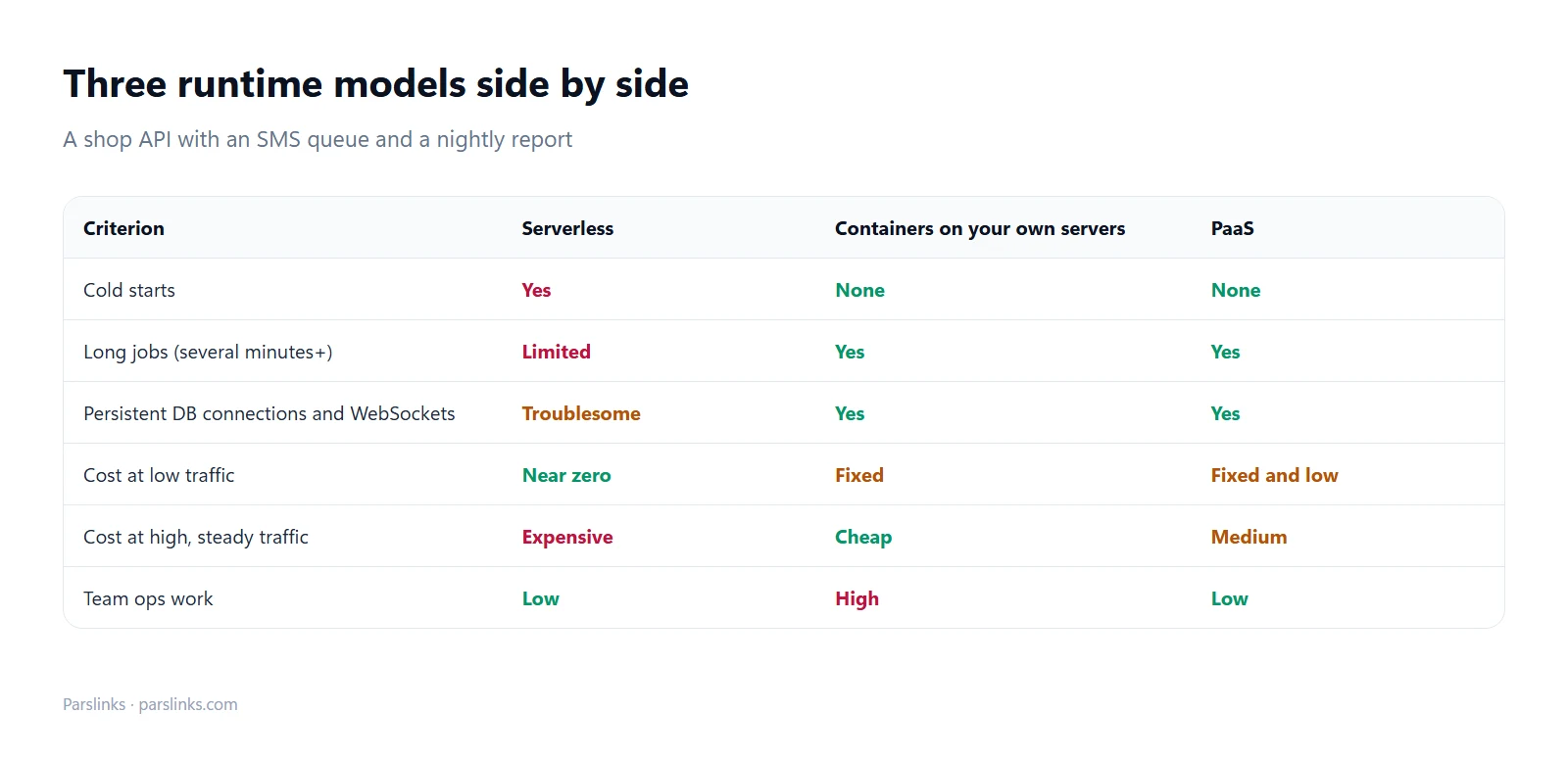
Compared for this API
Where serverless shines
Short, sporadic, stateless work: resizing an image after upload, answering a webhook, a contact form filled in ten times a day. Zero traffic means zero cost, and sudden spikes are absorbed without planning.
Where serverless hurts
For our shop API it has three serious problems:
Cold starts. The first request after idle time waits for the function to boot, sometimes one to several seconds. For a user who just pressed pay, that's long.
Database connections. Every function instance opens its own connection. With a hundred concurrent requests you have a hundred connections to PostgreSQL and the database hits its limit. There's a fix (a separate pooler), but it's one more piece to run.
Long jobs. An eight-minute nightly report exceeds most serverless execution limits and has to be broken up.
And a local note: the big global serverless providers are also hard to pay for from Iran and carry sanctions risk.
Containers on your own servers
Full control and low cost for steady load. But Docker Compose on a server means all the VPS responsibilities (patches, SSL, backups, monitoring) plus managing images. Add Kubernetes and you add a whole extra layer. We cover that decision in do you need Kubernetes.
PaaS
Always-on processes, persistent database connections, long jobs and queues, no cold starts, and server upkeep handled by the platform. The cost: under very large, steady load it's pricier than raw servers, and you don't get low-level control.
| Workload | Suggested model |
|---|---|
| API and website with normal daily traffic | PaaS |
| Short, sporadic jobs (webhooks, image resizing) | Serverless, or a small process on PaaS |
| Queue workers and scheduled jobs | PaaS or containers |
| Heavy, steady load with an infra team | Containers on your own servers |
| Experimental project with near-zero traffic | Serverless, or PaaS on a small plan |
What the shop team chose
The team put the API, the SMS worker and the nightly report on a PaaS: three processes from one repo, with one deploy method and one place for logs. Product-image resizing went to a small separate process. Next year, if traffic grows tenfold and they hire a full-time infrastructure engineer, they'll run the numbers again. Architecture decisions have expiry dates too.
Frequently asked questions
Join the discussion
No comments yet. Be the first to share your thoughts.
Related posts
- Platform
PaaS or a VPS? The real DevOps hours behind a small team's server
The VPS price is on the invoice. The hours spent on patches, SSL renewals, deploy scripts and midnight restarts are not. This post counts those hours, compares them with a platform, and is honest about when a VPS is still the better call.
- Deploy
Do you really need a Dockerfile? Framework presets vs. custom containers
Many teams start every deployment by writing a Dockerfile. This post shows where a framework preset is enough, where you genuinely need a custom container, and what not to forget if you do write one.
- Guides
Monitoring and logs for a small team: four numbers that are enough to start
The first person to notice your site is down shouldn't be a customer. This post explains the four basic signals (latency, traffic, error rate and saturation), suggests sensible alert thresholds for each, and shows how to write logs that help on incident day.