
Do you need Kubernetes? The threshold where it starts to pay off
Kubernetes is a superb tool for a problem you probably don't have yet.
Founder & CTO, Parslinks
After raising funding, the CTO of an urban-transport startup in Tehran decides to "professionalise the infrastructure". Three months later the team has a Kubernetes cluster with a Helm chart per service, Ingress, cert-manager, Prometheus and Grafana. It's all beautiful. But in those three months the driver app shipped no new features, one of the two backend developers spent all their time on the cluster, and when Kubernetes needs upgrading, nobody dares touch it.
The team had three services: an API, a worker and an admin panel.
What exactly does Kubernetes give you?
Kubernetes is a system for running containers across many machines: scheduling, keeping things up, scaling, internal networking between services and rolling deploys. For an organisation with dozens of services and several teams, these are real problems and Kubernetes is the best answer available.
But each of those capabilities comes with upkeep:
- Version upgrades: Kubernetes ships new versions every few months and old ones lose support.
- The ecosystem: an ingress controller, cert-manager, storage, monitoring, logging; each a separate project with its own versions and settings.
- Security: RBAC, network policies, image scanning, and secrets that by default are only base64-encoded, not encrypted.
- Team knowledge: when something breaks, someone has to know how Pods, ReplicaSets, Services and Ingress fit together.
Five questions
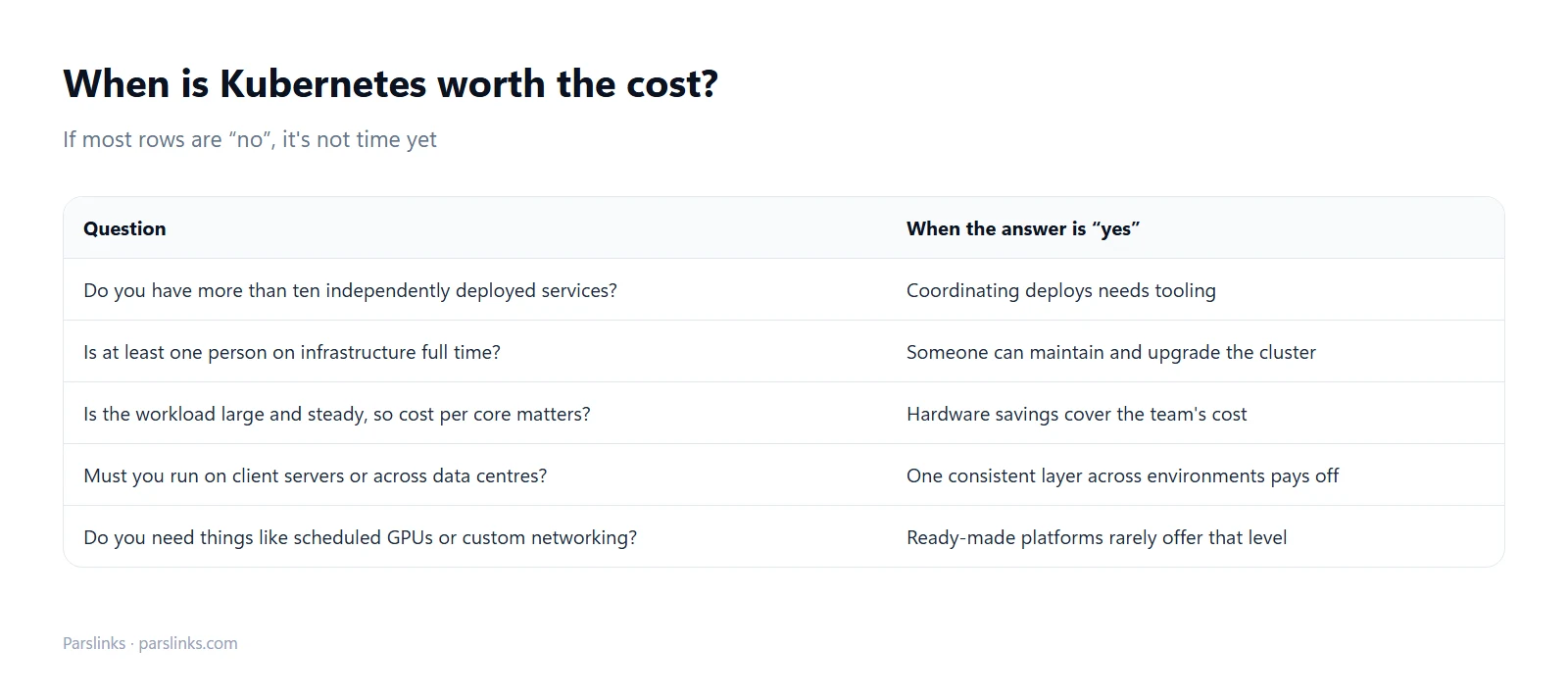
If three or more answers are "yes", Kubernetes probably pays for itself. If most are "no", a PaaS gives you what you actually need (zero-downtime deploys, scaling, rollback, logs) without a cluster to look after.
Count the cost in hours
For a small self-managed cluster (on your own servers), this estimate is conservative:
| Task | Hours per month (estimate) |
|---|---|
| Upgrading Kubernetes and ecosystem components (amortised) | 6–10 |
| Patching node operating systems | 3–5 |
| Maintaining monitoring, logging and alerts | 4–8 |
| Debugging networking and storage issues | 5–15 |
| Reviewing security and access | 2–4 |
| Total | 20–40 hours |
Twenty to forty hours a month is a quarter to half of one engineer's time. For a five-person team, that's a big share of capacity. Managed Kubernetes takes part of this load (the control plane and its upgrades), but the rest is still yours.
If you're on Kubernetes today and it's heavy
Going back isn't failure. Many teams, after the experience, move simple services to a PaaS and keep Kubernetes only where it's truly needed (GPU processing, for example). If the apps are defined by a Dockerfile and environment variables, moving them is usually days of work, not months.
If you'll need it one day
To keep a future migration simple, start today:
- Build every service with a Dockerfile or standard commands.
- Read configuration only from environment variables.
- Keep services stateless: files in object storage, sessions in Redis or the database.
- Give each a health route and graceful shutdown.
Those four make an app ready for a PaaS and for Kubernetes alike. After six months, our transport startup moved the API and admin panel back to a PaaS, and that backend developer is working on the product again.
Frequently asked questions
Join the discussion
No comments yet. Be the first to share your thoughts.
Related posts
- Platform
PaaS or a VPS? The real DevOps hours behind a small team's server
The VPS price is on the invoice. The hours spent on patches, SSL renewals, deploy scripts and midnight restarts are not. This post counts those hours, compares them with a platform, and is honest about when a VPS is still the better call.
- Platform
What does 99.9% uptime mean? SLAs in minutes, and what the contract doesn't tell you
Providers talk about 99.9% and 99.99% uptime, but few people work out how many minutes each nine is, what doesn't count against it, and what the compensation really is. This post unpacks the numbers and shows what your app's real uptime is made of.
- Guides
Monitoring and logs for a small team: four numbers that are enough to start
The first person to notice your site is down shouldn't be a customer. This post explains the four basic signals (latency, traffic, error rate and saturation), suggests sensible alert thresholds for each, and shows how to write logs that help on incident day.