
PaaS or a VPS? The real DevOps hours behind a small team's server
Before you renew the next server, count how many hours your team spent keeping it alive last month.
Thursday, 11pm. A customer messages you: their browser is showing a security warning on your site. The SSL certificate expired yesterday. The certbot timer stopped running after an OS upgrade two months ago, and nobody noticed. The only person with SSH access to the server is on a plane.
Plenty of small teams have lived some version of this night. The VPS isn't the problem; a VPS is a perfectly good tool. The problem is how we compare it. We look at the monthly price, not at the hours the team quietly spends keeping the thing running.
This post counts those hours, puts them next to a platform (PaaS), and is upfront about where a VPS still wins.
The server price is the smallest part of the bill
A VPS invoice has one clear number. The real cost of running an app on it has three parts:
- Rent: the number on the invoice.
- Ops hours: the time developers spend on patches, configuration, deploys and server debugging instead of the product.
- Downtime: lost orders, damaged trust, and the hours the whole team spends on an incident.
Everyone budgets for the first. The second rarely gets written down, because it hides inside the working day as "I spent half an hour fixing nginx". Multiply those hours by what a developer actually costs per hour, and on most small teams the result is bigger than the rent.
Who looks after which layer?
The real difference between a VPS and a platform is where the responsibility line sits. With a VPS, the provider hands you hardware and network, and everything from the operating system up is yours. With a platform, you bring code and app configuration and the provider runs the layers underneath.
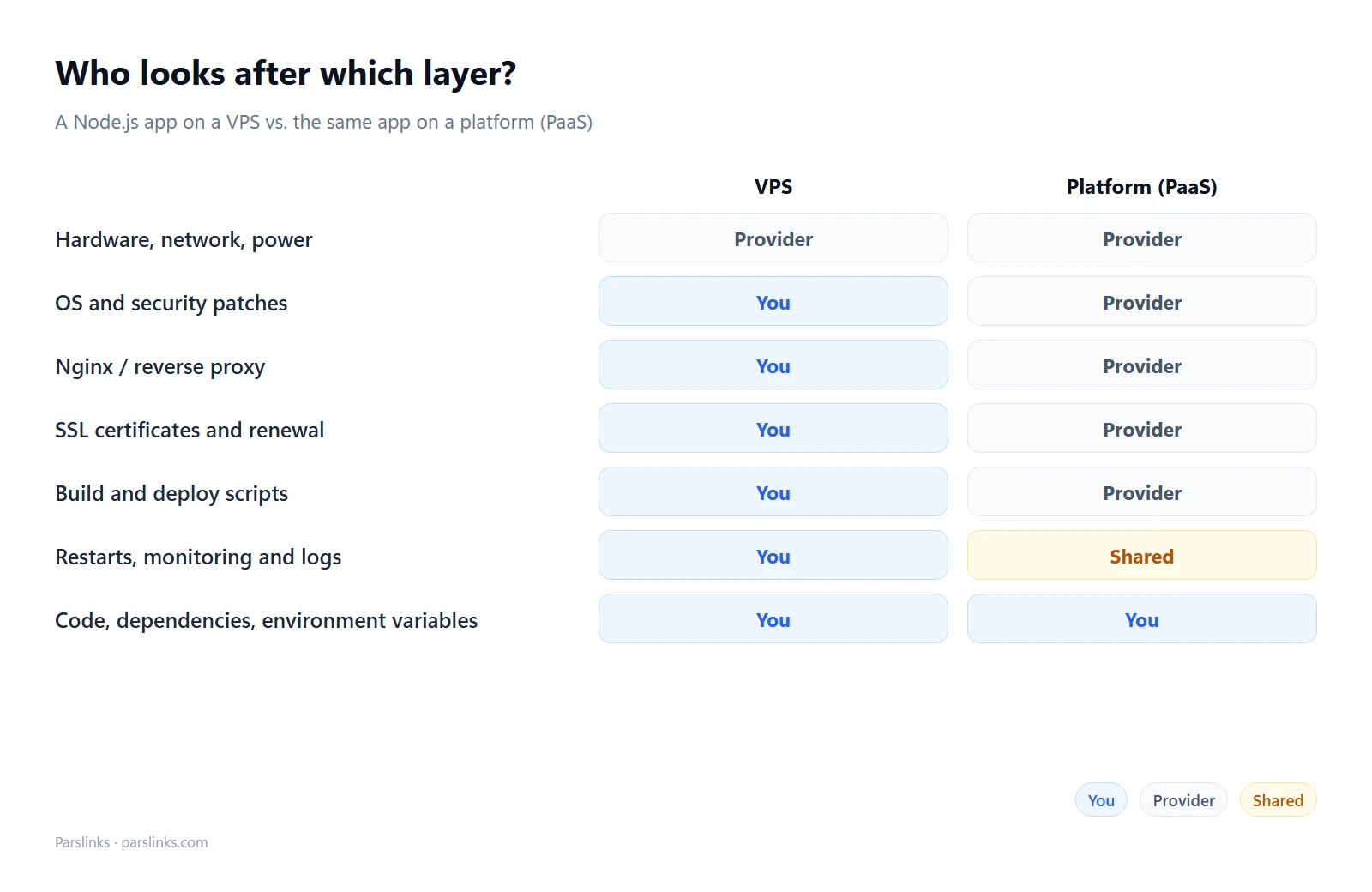
Side by side with the other common cloud model:
| Layer | VPS (IaaS) | Platform (PaaS) | Ready-made software (SaaS) |
|---|---|---|---|
| Hardware and network | Provider | Provider | Provider |
| OS and security patches | You | Provider | Provider |
| Web server, proxy, SSL | You | Provider | Provider |
| Build and deploy | You | Provider (your settings) | — |
| Application code | You | You | Provider |
| Data and business settings | You | You | You |
SaaS is there for completeness. When you're building your own product, the real choice is between the first two columns.
An ordinary month, hour by hour
To keep this concrete, take a common setup: a three-person team, a Next.js front end, a Node.js API and a PostgreSQL database. The chart below is our estimate of ops time in a normal month, one where nothing dramatic happened.
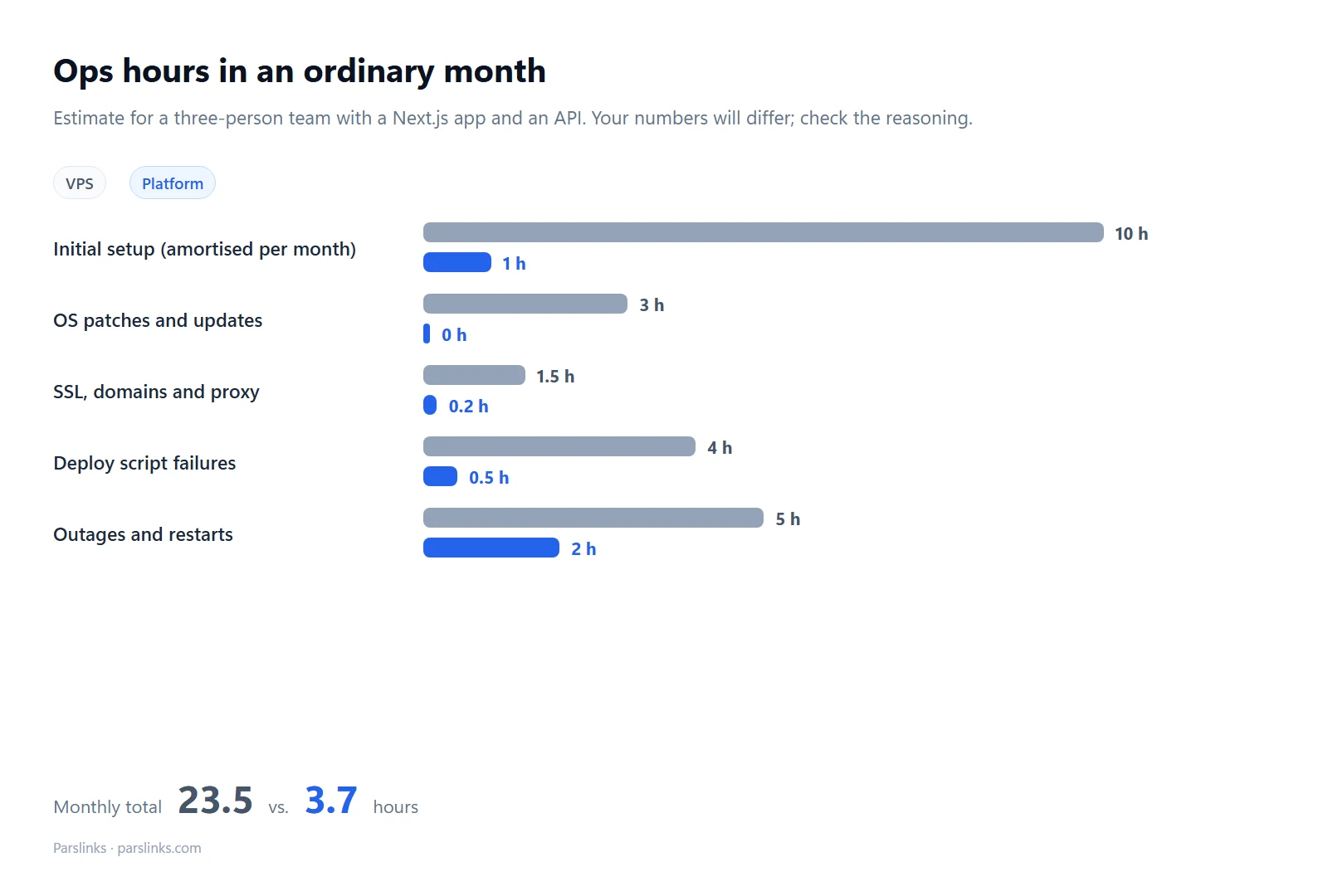
The numbers won't match your team exactly, but the reasoning behind them is easy to check:
| Task | VPS | Platform | Notes |
|---|---|---|---|
| Initial setup (amortised per month) | 10 h | 1 h | Server, users, firewall, Nginx, services and scripts take 30–40 hours, and usually get redone every few months during a migration or rebuild |
| OS patches and updates | 3 h | 0 | Security updates, reboots, checking nothing broke |
| SSL, domains and proxy | 1.5 h | under 0.5 h | Certificate renewals, new subdomains, header tweaks |
| Deploy script failures | 4 h | 0.5 h | Full disk, wrong Node version, broken cache, a process that didn't come back |
| Outages and restarts | 5 h | 2 h | A platform doesn't make outages zero; a bug in your code is still yours |
| Total | 23.5 h | about 4 h |
Twenty hours a month is roughly three full working days from one person. For a team of three, that's about five percent of total capacity, spent just keeping things where they already are.
Where a VPS genuinely wins
If this post were only a pitch for platforms, this section wouldn't exist. A VPS is the more sensible choice when:
The workload is heavy and steady. If your app runs around the clock at a fairly constant load, and you have people for whom server upkeep is the day job, compute per unit is usually cheaper on a VPS or dedicated machine.
You need low-level control. A custom kernel module, GPU drivers, unusual network setup, or software that only runs on one particular distro: none of these belong on a platform.
There are legal or contractual requirements. Some organisations must know exactly which hardware and data centre holds their data, and who can touch it.
The goal is learning. Setting up a Linux server from scratch is the best way to understand what platforms do behind the scenes. On a side project, those hours aren't a cost. They're tuition.
Where a platform wins
A platform shines when the bottleneck is people's time, not compute cost:
- The team is under five people and nobody owns infrastructure full time.
- You run several small projects that would each need their own server.
- You deploy several times a day and want a preview link for every branch.
- Nobody on the team should be getting up at 3am to restart a service.
On Parslinks you connect a repo from GitHub, GitLab or Bitbucket, confirm the install, build and start commands, and from then on every push produces its own build and preview. Once a preview is approved, that same artifact is promoted to production, and if something goes wrong you roll back without rebuilding. SSL, the proxy and OS patches sit in layers you no longer have to think about.
Know the hidden costs of a platform too
Platforms aren't free either, and it's better to know this before you migrate:
It gets more expensive at scale. At high resource usage, compute on a platform costs more per unit than a raw server. That premium is what you pay for the hours you save. Past a certain point, hiring an infrastructure engineer becomes the cheaper option.
You get less control. You can't install every system package or open every port. Most web apps never notice, but some workloads do.
Lock-in. If your app leans on one platform's proprietary features, moving gets hard. The low-risk approach is to define builds with standard commands (like npm run build) or a Dockerfile, so the project runs anywhere.
A rule of thumb
| Your situation | Recommendation | Why |
|---|---|---|
| 1–5 person team, nobody owns infrastructure | Platform | Team hours are your most expensive resource |
| Several small projects or client work | Platform | Each project doesn't need its own server and scripts |
| Heavy, steady load and an infra team | VPS or dedicated | Cost per unit of compute starts to matter |
| Need GPUs, kernel or special networking | VPS | A platform won't give you that level of access |
| Web app plus one heavy specialised service | Hybrid | App on the platform, special service on a server |
That last row is more common than you'd think. You don't have to move everything at once. Put the front end and API on a platform and keep the one service that really needs its own machine where it is.
If you're on a VPS today
Migrating doesn't have to be a risky overnight job. The order that works best for small teams:
- Make the app stateless. Move user uploads off the server's disk into object storage, and keep sessions in the database or Redis. An app that writes to local disk won't stay stable on any platform.
- Collect your environment variables. Everything defined in a
.envon the server or in a systemd unit needs to move into the project settings. - Preview first, production second. Connect the project and test the preview against a staging database.
- Lower your DNS TTL a day ahead, to something like 300 seconds, so the domain switch is quick and so is the way back.
- Keep the old server for a week. If something was missed, you still have a way back.
If you remember one thing
Don't compare the price of a VPS with the price of a platform. Compare the VPS price plus your team's hours with the platform price. For a team that wants to build a product, those hours are usually the most expensive part of the equation.
Frequently asked questions
Join the discussion
No comments yet. Be the first to share your thoughts.
Related posts
November 24, 2026
A Vercel alternative for teams in Iran: what it actually has to replace
Foreign-card payments, the risk of a suspended account and unreliable access to vercel.app push teams in Iran to look elsewhere. But renting a server and running next start covers only a small part of what Vercel did. Here is the full list, and how the alternatives compare.
November 24, 2026
Zero-downtime deployments in practice: rolling, blue/green, and promoting the same artifact
A restart is the simplest way to deploy, and the seconds the service is down are the seconds orders fail. This post lists where downtime really comes from, compares three common release strategies, and shows how to change your database without an outage.
November 24, 2026
Do you really need a Dockerfile? Framework presets vs. custom containers
Many teams start every deployment by writing a Dockerfile. This post shows where a framework preset is enough, where you genuinely need a custom container, and what not to forget if you do write one.