
Multi-stage Dockerfiles for Node.js: from 1.2 GB to 150 MB
Smaller images mean faster deploys, faster rollbacks and less to attack. Most of the win takes a few lines.
Co-founder & Head of Development and Communications, Parslinks
Run docker images on a typical Node.js project and the number is sobering. Ours, for an internal invoicing API, was 1.2 GB. Inside: TypeScript, native build toolchains, the npm cache, test fixtures and, somehow, the whole .git directory. None of it is needed to run node dist/server.js.
Oversized images cost you three ways. They're slow to push and pull, which slows every deploy and every rollback. And every tool left inside is something an attacker could use.
The idea: build in one place, run in another
A multi-stage Dockerfile has several FROM lines. Early stages install everything and build the app. The final stage starts from a clean base and copies in only the build output and runtime dependencies. Whatever you don't copy doesn't exist in the final image.
Why each line is there
Manifests before source. Docker caches each layer until its inputs change. Because only the lockfile is copied before npm ci, dependencies reinstall only when they actually change. Editing a route handler rebuilds just the later stages.
npm prune --omit=dev. Once the build is done, TypeScript, linters and test runners are dead weight. This removes them.
A non-root user. If someone exploits a bug in your app, a limited user can do far less inside the container.
.dockerignore. Don't skip it. Without one, your local node_modules, .git and .env files all get sent into the build context.
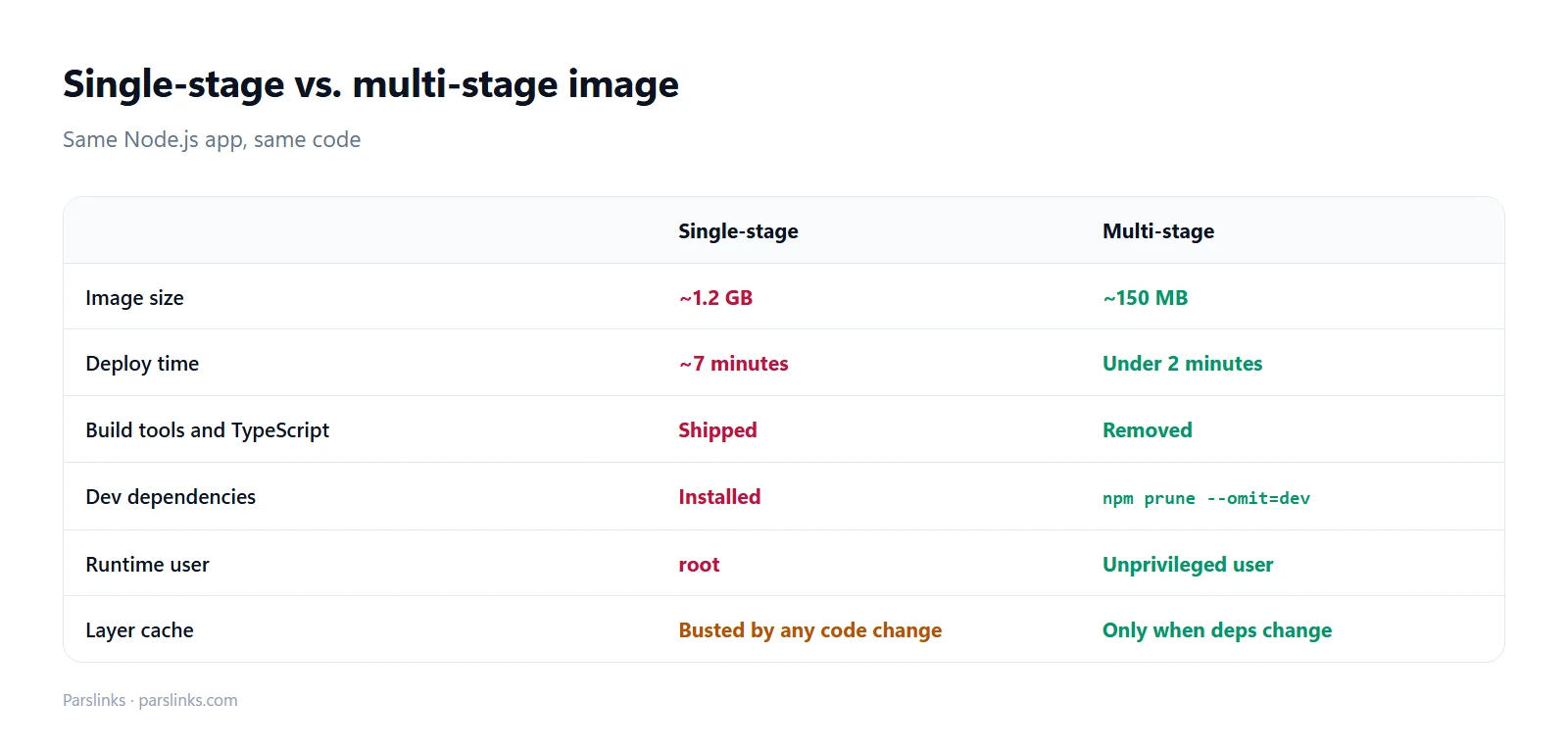
The result
The invoicing API went from 1.2 GB to about 150 MB. Deploys dropped from around seven minutes to under two, and since the dependency layer is usually cached, most builds finish in under a minute.
If your platform builds images straight from source, you may not need a Dockerfile at all; we cover when to write one in Do you really need a Dockerfile?. But if you do write one, make it multi-stage.
Frequently asked questions
Join the discussion
No comments yet. Be the first to share your thoughts.
Related posts
- Deploy
Do you really need a Dockerfile? Framework presets vs. custom containers
Many teams start every deployment by writing a Dockerfile. This post shows where a framework preset is enough, where you genuinely need a custom container, and what not to forget if you do write one.
- Deploy
Node.js hosting: shared hosting, a VPS or a platform?
Many people put their first Node.js app on the same cPanel host as their WordPress site, then find out why it dies every few hours. This post explains what Node.js needs from a host and compares the three common options.
- Product
Rollback in 30 seconds: why going back shouldn't depend on a rebuild
Most teams roll back like this: revert, push, wait for the build. Using a real incident, this post shows why that's slow at the worst possible moment, how rolling back to the previous artifact works, and what no rollback can undo.