
Do you really need a Dockerfile? Framework presets vs. custom containers
Dockerfiles are a great tool. For an app that's just Next.js or Django, though, they're often one more file to maintain.
A four-person team had a 120-line Dockerfile for their Next.js app. None of the current team had written it; it was copied from a previous project. The base image hadn't been updated in two years, builds took eight minutes, and once, when Node needed a newer version, half a day went into finding the line that pinned it.
When we deployed the same project with no Dockerfile, using only the Next.js preset, builds dropped under three minutes and those 120 lines were deleted from the repo.
That doesn't make Docker bad. For plenty of problems it's the best answer. The question is which problem you have.
What does a preset actually do?
A preset means the platform knows your framework and how to build it. For a Next.js app, the platform detects the package manager (npm, pnpm or yarn) from package.json and the lockfile, installs dependencies with a cache, runs build, and starts the output with settings suited to that framework.
In practice that's the same work you'd write in a good Dockerfile, except someone else maintains it: the base image gets updated, OS security patches get applied, and the dependency cache is kept between builds.
| Criterion | Framework preset | Custom Dockerfile |
|---|---|---|
| Setup time | Minutes; connect the repo | An hour to a day, depending on experience |
| Base image updates and security patches | Handled by the platform | Yours; if forgotten, they don't happen |
| Arbitrary system packages (ffmpeg, etc.) | Limited | Anything |
| Identical runs locally and on other servers | Depends on the platform | Yes; the image is the same everywhere |
| Build cache | Automatic | You have to order the layers correctly |
| Good for | Common web apps and APIs | Special runtimes, native dependencies, running in several places |
Four questions to decide
Ask these in order. The first answer that leads to a Dockerfile settles it; if none do, a preset is the better choice.
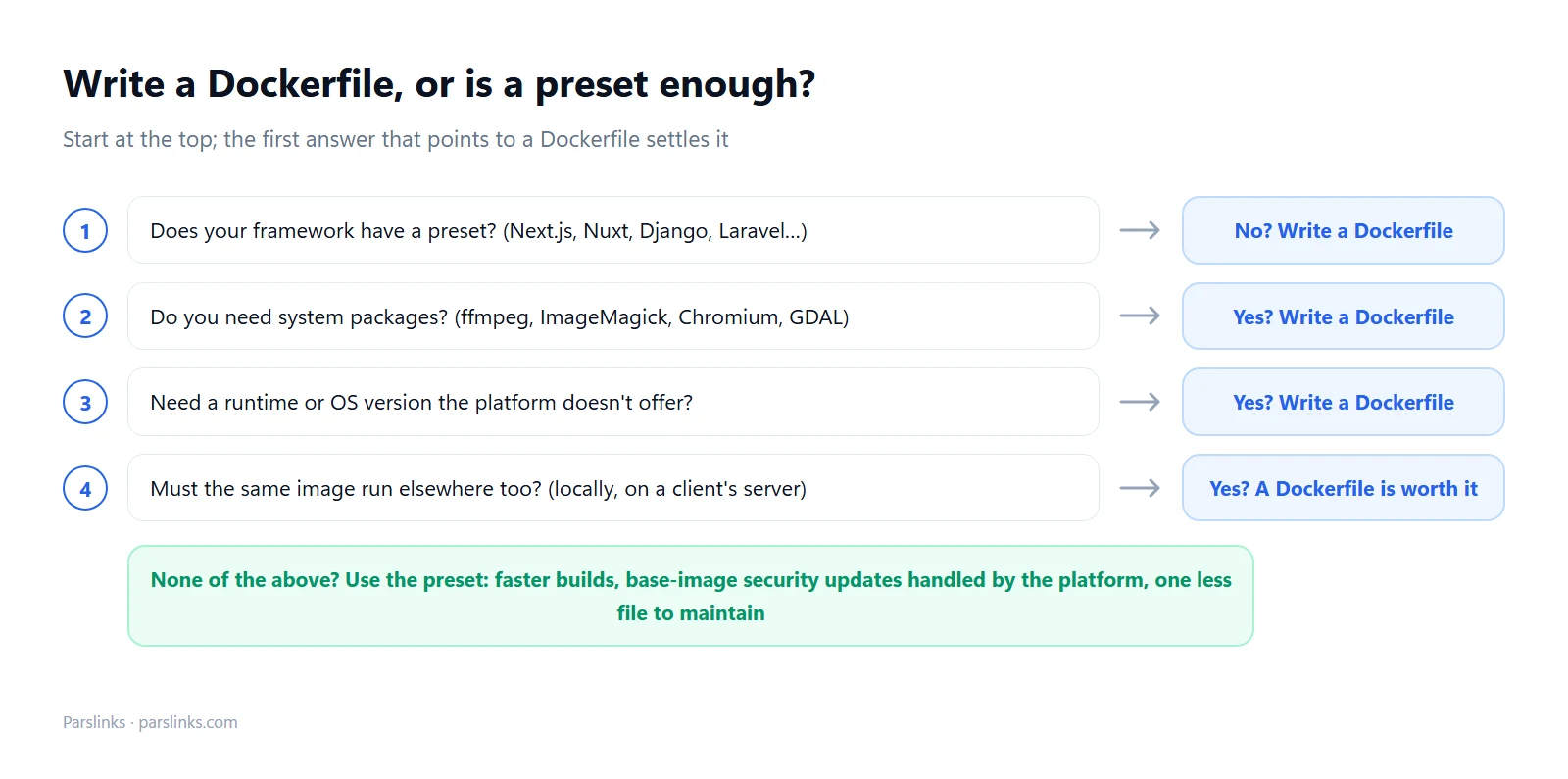
System packages are the most common real reason. An app that transcodes video with ffmpeg, renders PDFs with headless Chromium, or processes geodata with GDAL needs things npm install won't give it.
A specific runtime is a valid reason too: an old Python version an old library depends on, or a language the platform has no preset for.
Running in several places matters when the same image has to run identically on a client's server, in an isolated environment, or on teammates' laptops.
What's not on the list: "because everyone uses Docker" and "we might need it later". If you need it later, writing a Dockerfile for a standard app takes an hour. Maintaining an unused Dockerfile is a cost you pay every month.
If you need a Dockerfile, write it like this
Say your Node.js app needs ffmpeg to generate video thumbnails. A minimal, maintainable Dockerfile looks like this:
FROM node:22-slim AS deps
WORKDIR /app
COPY package.json pnpm-lock.yaml ./
RUN corepack enable && pnpm install --frozen-lockfile

FROM node:22-slim AS build
WORKDIR /app
COPY --from=deps /app/node_modules ./node_modules
COPY . .
RUN corepack enable && pnpm build

FROM node:22-slim AS run
# The only reason this file exists:
RUN apt-get update \
  && apt-get install -y --no-install-recommends ffmpeg \
  && rm -rf /var/lib/apt/lists/*
WORKDIR /app
ENV NODE_ENV=production
COPY --from=build /app/.next/standalone ./
COPY --from=build /app/.next/static ./.next/static
COPY --from=build /app/public ./public
USER node
EXPOSE 3000
CMD ["node", "server.js"]
A few things in this file that copied Dockerfiles usually miss:
- Multiple stages. Build tools and the full
node_modulesdon't end up in the final image. A smaller image ships faster and has less attack surface. - Copying the lockfile before the rest of the code. As long as dependencies haven't changed, the install layer comes from cache and builds are several times faster.
USER node. The app doesn't need to run as root, and if there's ever a vulnerability, this limits the damage.- A pinned base image (
node:22-slim) instead oflatest, so today's build and next month's are the same.
You also need a .dockerignore, or your local node_modules and .git folder end up in the build context:
node_modules
.next
.git
.env*
!.env.example
npm-debug.log*The middle path: preset now, Dockerfile when needed
Our suggestion for most small teams: start with the preset. On the day the first native dependency enters the project, add a Dockerfile. On Parslinks, if there's a Dockerfile at the project root (or in the folder you set as root), it's used; if not, the framework preset is. Everything else, from branch previews to domains to rolling back, works the same either way.
So today's decision isn't final. If you remove the Dockerfile one day, the app simply builds with the preset again.
Frequently asked questions
Join the discussion
No comments yet. Be the first to share your thoughts.
Related posts
November 24, 2026
Deploying Next.js to production: what SSG, ISR and SSR each need from your infrastructure
Each page's rendering mode decides what your server has to do. This post covers what SSG, ISR, SSR and PPR need from your infrastructure, how standalone output works, and what breaks once the app runs on more than one instance.
November 24, 2026
PaaS or a VPS? The real DevOps hours behind a small team's server
The VPS price is on the invoice. The hours spent on patches, SSL renewals, deploy scripts and midnight restarts are not. This post counts those hours, compares them with a platform, and is honest about when a VPS is still the better call.
November 24, 2026
A Vercel alternative for teams in Iran: what it actually has to replace
Foreign-card payments, the risk of a suspended account and unreliable access to vercel.app push teams in Iran to look elsewhere. But renting a server and running next start covers only a small part of what Vercel did. Here is the full list, and how the alternatives compare.