
Node.js hosting: shared hosting, a VPS or a platform?
A Node.js app isn't a PHP site. It's an always-on process, not a set of files run on each request.
Co-founder, Parslinks · Team, marketing & infrastructure
A freelance developer built an online ordering system in Node.js and Express for a group of restaurants in Isfahan. The client already had a cPanel host for their marketing site, and the panel even had a "Setup Node.js App" option. The app went up and worked. Three days later, at 8pm, the owner called: orders weren't coming through. Shared hosting kills processes that sit idle or exceed a memory cap, and the WebSocket connection that pushed orders live to the kitchen wasn't supported at all.
What does Node.js need from a host?
A PHP site is a set of files the web server runs on each request. A Node.js app is an always-on process that listens for requests itself. That difference creates a few concrete needs:
- The process must stay up, and restart if it crashes.
- The Node version must match the one you developed with.
- If you use WebSockets or Server-Sent Events, the proxy in front must hold long connections open.
npm installand the build must run somewhere with access to the npm registry.
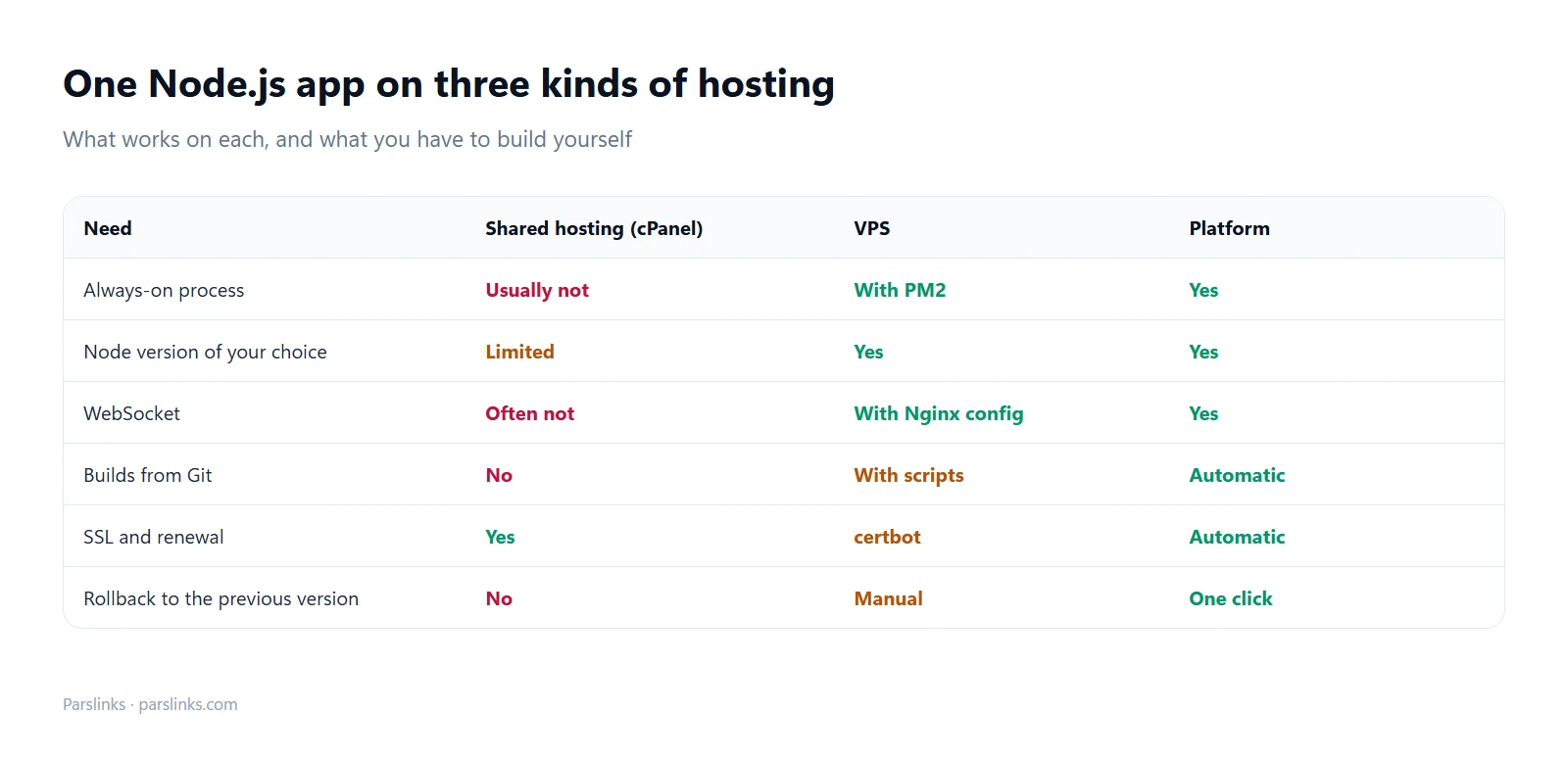
Three options side by side
Shared hosting
Not the right place for Node.js, even if the panel offers it. It usually uses Passenger or something similar that stops the process when idle, has low memory limits and doesn't support WebSockets. Fine for an experimental API, not for something a client depends on.
A VPS
Anything is possible, as long as you build it. The common setup:
Add certbot for SSL, a script for git pull, build and restart, and a plan for OS patches. All doable; the responsibility is yours, and usually stays with whoever set it up on day one.
A platform
You connect the repo; the platform reads the Node version from package.json or .nvmrc, installs and builds, keeps the process up, and supports WebSockets behind its proxy. Every push gets a preview, and rolling back needs no rebuild.
Two things you need wherever you deploy
Listen on PORT, not a hard-coded number. Platforms pass the port as an environment variable: app.listen(process.env.PORT ?? 3000).
Graceful shutdown. When a new version ships, the old process gets SIGTERM. Stop accepting new connections and let in-flight requests finish. For the restaurant ordering app, that means an order being saved mid-deploy isn't lost.
In short
For Node.js, use shared hosting only for experiments. A VPS makes sense when someone on the team owns its upkeep. For most small and medium projects, a platform gives Node.js what it needs, without scripts only one person understands.
Frequently asked questions
Join the discussion
No comments yet. Be the first to share your thoughts.
Related posts
- Platform
PaaS or a VPS? The real DevOps hours behind a small team's server
The VPS price is on the invoice. The hours spent on patches, SSL renewals, deploy scripts and midnight restarts are not. This post counts those hours, compares them with a platform, and is honest about when a VPS is still the better call.
- Guides
Moving from cPanel to Git-based deploys: a step-by-step guide for small teams
FTP uploads and editing files in cPanel's File Manager work for a small site, until two people change the same file at once. This guide walks through moving a PHP or Node.js site from cPanel to Git-based deploys, including the database, uploads, email and DNS.
- Deploy
Deploying Next.js to production: what SSG, ISR and SSR each need from your infrastructure
Each page's rendering mode decides what your server has to do. This post covers what SSG, ISR, SSR and PPR need from your infrastructure, how standalone output works, and what breaks once the app runs on more than one instance.