
Connecting a domain to your app: A, CNAME, the apex, and why DNS changes seem slow
A few minutes in your DNS panel, as long as you know what each record does and what TTL is doing to you.
It's 9:45am and the product launch goes public at 10. You've pointed the DNS record at the new server, and on your laptop everything looks right. At 10:20 the head of sales messages you: they still see the old page. By 2pm, a few customers are saying the same.
Nothing was broken. The old record's TTL was 86400 seconds, which meant any DNS server that fetched the old answer yesterday was allowed to keep handing it out for up to 24 hours.
Connecting a domain to an app isn't hard, but three small things decide whether it takes minutes or a day: which record, on which name, and with what TTL.
DNS in one paragraph
When someone types your address, the browser asks a resolver (usually their ISP's or their company's DNS server) where that name points. If the resolver has the answer cached, it returns it. If not, it asks your domain's authoritative servers and keeps the answer for as long as the TTL says. So any change you make in your DNS panel only reaches a user once their resolver's cached copy expires.
Apex or www: which record?
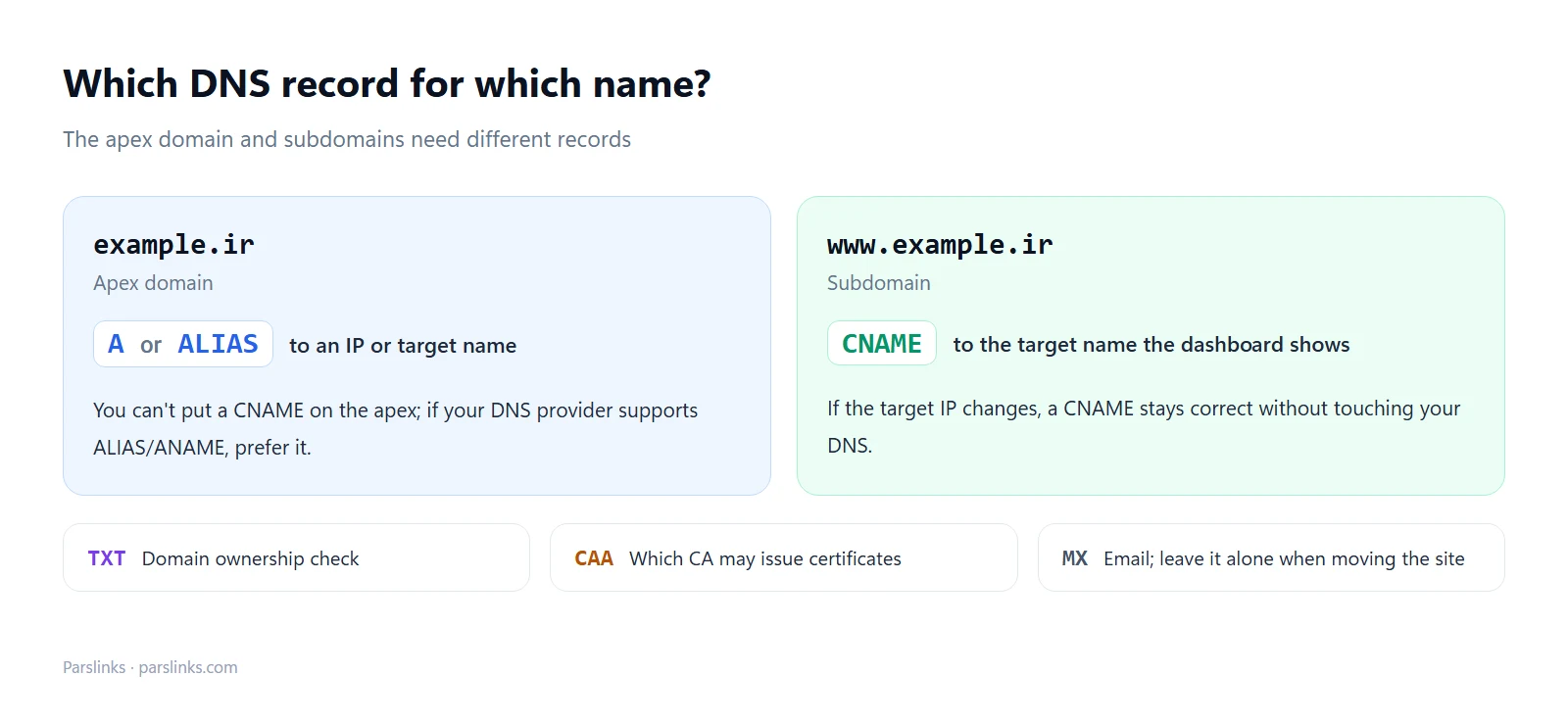
The apex domain (like example.com, also called the root or naked domain) and subdomains (like www.example.com or app.example.com) follow different rules.
Subdomains use CNAME. A CNAME says "this name is an alias for that one". The benefit: if the target's IP ever changes, you don't need to touch your DNS. For www and any other subdomain, a CNAME to the target your platform shows is usually the best choice.
The apex uses A or ALIAS. You can't put a CNAME on the apex, because a CNAME can't coexist with other records on the same name and the apex always has SOA and NS records. You have two options: an A record (plus AAAA if needed) pointing at the IP the platform gives you, or, if your DNS provider supports ALIAS, ANAME or "CNAME flattening", the same CNAME-like behaviour on the apex.
Two more records come up often when connecting a domain:
| Record | Purpose | Example value | Note |
|---|---|---|---|
A / AAAA | Name → IPv4 / IPv6 address | 203.0.113.10 | The most common choice for the apex |
CNAME | Name → another name | The target the dashboard shows | Not allowed on the apex, nor next to another record on the same name |
ALIAS / ANAME | CNAME behaviour on the apex | The target the dashboard shows | Depends on your DNS provider |
TXT | Ownership checks and service settings | Verification token | A name can have several TXT records at once |
CAA | Which certificate authorities may issue | 0 issue "letsencrypt.org" | If present without your platform's CA, SSL won't be issued |
MX | Where the domain's email goes | Your mail server | Leave it alone when moving the website |
TTL: why DNS changes show up "late"
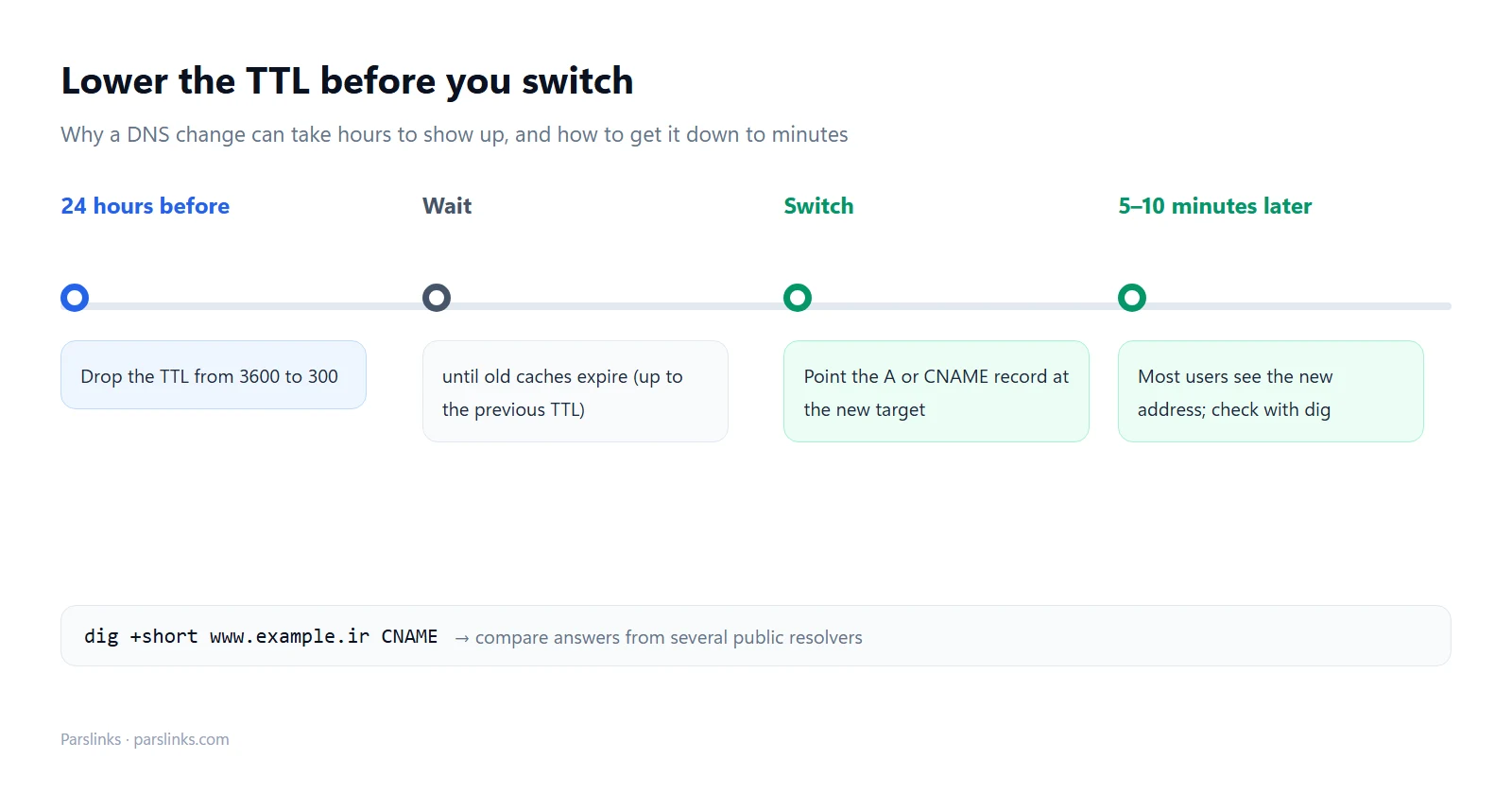
TTL is a number of seconds attached to each record that tells resolvers how long to keep the answer. If the old record had a TTL of 3600, some users will keep getting the old address for up to an hour after you change it. With 86400, that's a full day.
The subtler point: a new TTL only takes effect after the old one expires. If you lower the TTL from 86400 to 300 on launch morning and switch the record straight away, it doesn't help; caches that picked up the old answer with a one-day TTL are still valid. That's why you lower the TTL a day ahead.
On Parslinks, step by step
The process on Parslinks is the same thing you'd do in any DNS panel, with more precise guidance:
- Add the domain in the project settings. Add both the apex and
wwwso both work. - Create the records the dashboard shows. A/AAAA or ALIAS for the apex, CNAME for subdomains. Copy the values from the dashboard, not from memory or another article.
- Wait for verification. Once the records resolve correctly, ownership is confirmed and a TLS certificate is issued automatically.
- Pick the primary domain and redirect. Decide whether visitors stay on
example.comor go towww.example.com, so search engines see a single version.
And before anything else: if you're moving a domain that currently points at another server, lower the existing records' TTL to 300 a day in advance.
See what the world actually sees
Browsers and operating systems have their own caches, so "it works on my machine" proves nothing. Use dig to ask several public resolvers directly. On Windows, nslookup works on the same principle.
# Your current resolver's answer
dig +short example.com A
dig +short www.example.com CNAME

# Compare different public resolvers
dig @1.1.1.1 +short example.com A
dig @8.8.8.8 +short example.com A

# Remaining TTL (second column of the answer)
dig example.com A +noall +answer

# Full path from the root to the authoritative server; skips caches
dig +trace example.com A

# Which CAs may issue certificates
dig +short example.com CAA
Records vs. nameservers
Changing records (A, CNAME and so on) happens in your DNS provider's panel and propagates according to its TTL. Changing nameservers (NS) means moving the whole DNS management of the domain to a different provider. That happens at your registrar (for .ir domains, through IRNIC) and is usually slower than changing a record.
If all you want is to bring a site to Parslinks, you usually don't need to change nameservers; create the records at your current DNS provider. If you do decide to switch DNS providers, recreate every existing record at the new provider before changing nameservers, especially MX and the email TXT records.
When something doesn't work
Most domain problems follow a handful of patterns:
| Symptom | Likely cause | Fix |
|---|---|---|
| Some people still see the old site | Resolvers caching with the old TTL | Wait out the old TTL; next time lower it a day earlier |
| The new name "doesn't exist" for some people | A negative answer cached before the record existed | Wait for the SOA minimum; create records before testing |
| SSL certificate won't issue | A restrictive CAA record, or the record isn't resolving to the right target yet | Check CAA with dig and add your platform's CA |
| Redirect loop or "too many redirects" | A CDN proxy in front of the domain with a mismatched SSL mode | Set the CDN's SSL mode to Full, or pause the proxy temporarily |
| Email stops arriving after the move | MX records weren't recreated at the new provider | Move MX and the email TXT records (SPF, DKIM) |
Frequently asked questions
Join the discussion
No comments yet. Be the first to share your thoughts.
Related posts
November 24, 2026
PaaS or a VPS? The real DevOps hours behind a small team's server
The VPS price is on the invoice. The hours spent on patches, SSL renewals, deploy scripts and midnight restarts are not. This post counts those hours, compares them with a platform, and is honest about when a VPS is still the better call.
November 24, 2026
Moving from cPanel to Git-based deploys: a step-by-step guide for small teams
FTP uploads and editing files in cPanel's File Manager work for a small site, until two people change the same file at once. This guide walks through moving a PHP or Node.js site from cPanel to Git-based deploys, including the database, uploads, email and DNS.
November 24, 2026
A Vercel alternative for teams in Iran: what it actually has to replace
Foreign-card payments, the risk of a suspended account and unreliable access to vercel.app push teams in Iran to look elsewhere. But renting a server and running next start covers only a small part of what Vercel did. Here is the full list, and how the alternatives compare.