
Deploying a monorepo: Turborepo, pnpm workspaces and the project root
One repo with several apps is great, as long as a one-line CSS change to the site doesn't rebuild the dashboard too.
Co-founder, Parslinks · Team, marketing & infrastructure
The Parslinks website, its dashboard and their shared component library live in one repo: apps/web, apps/dashboard and packages/ui, with pnpm workspaces and Turborepo. When the team changes a button in packages/ui, both apps must rebuild. When only the About page copy in apps/web changes, building the dashboard is wasted time.
This post uses that structure as the example, because we work with it every day.
The example layout
One project per app on the platform
The common mistake is treating the whole repo as one project. Every deployable app is its own project with its own settings:
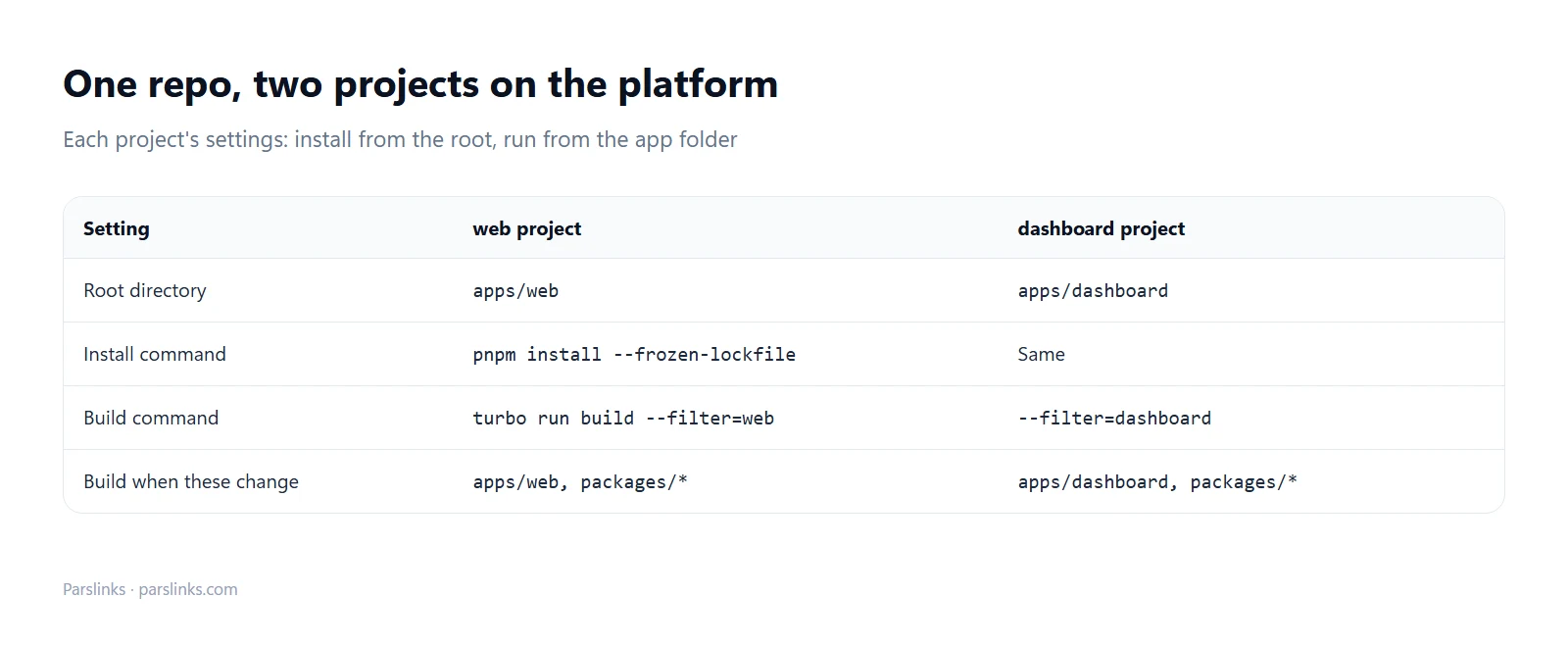
The key point: install from the repo root, because the lockfile and workspace live there. If the platform only sees apps/web, it can't find packages/ui and the build fails with "Cannot find module".
Filtered builds with Turborepo
Instead of running build in every package, build only the target app and its dependencies:
dependsOn: ["^build"] means the packages an app depends on are built before it. The env field tells Turborepo these variables affect the build output; forget it, and the cache may hand back a build with an old NEXT_PUBLIC_ value.
Don't build apps that didn't change
When only apps/web changed, the dashboard doesn't need a build. For each project, list the paths whose changes require a build: the app's own folder and the shared packages. Platforms usually support this with a "only build when these paths change" setting or an ignore-build command:
Next.js in a monorepo: standalone and file tracing
With output: "standalone", Next.js collects only the files it needs. In a monorepo you must tell it where the tracing root is, or files from shared packages get left out:
From our own experience: once, after adding a library, the standalone image was built without @swc/helpers and pages errored in production while everything was fine on laptops. Always run the standalone output locally once with node server.js.
In short
One project per app; install from the root; filtered builds; and an exact list of the paths that require a build. With those four, a monorepo deploys as simply as a single-app repo.
Frequently asked questions
Join the discussion
No comments yet. Be the first to share your thoughts.
Related posts
- Deploy
Deploying Next.js to production: what SSG, ISR and SSR each need from your infrastructure
Each page's rendering mode decides what your server has to do. This post covers what SSG, ISR, SSR and PPR need from your infrastructure, how standalone output works, and what breaks once the app runs on more than one instance.
- Deploy
Do you really need a Dockerfile? Framework presets vs. custom containers
Many teams start every deployment by writing a Dockerfile. This post shows where a framework preset is enough, where you genuinely need a custom container, and what not to forget if you do write one.
- Product
A preview for every branch: reviewing work without queueing for shared staging
One staging server for the whole team means only one change can be reviewed at a time, and nobody knows whose change a bug belongs to. This post shows how a preview per branch changes the workflow for designers, product managers and testers, and what to set up right from the start.