
Next.js image optimization: lighter product pages without losing quality
Images are usually the heaviest part of a page. A few settings remove most of that weight.
Co-founder & Head of Development and Communications, Parslinks
A boutique selling handmade ceramics launches a new collection with gorgeous studio photography. Each photo is 4 MB and 4,000 pixels wide. On the office laptop it looks great. On a phone over 4G, shoppers stare at grey boxes for eight seconds.
That phone's screen is 400 CSS pixels wide. Roughly 90% of those 4 MB is never seen.
What next/image does for you
The Image component takes your original and, on request, generates and caches a version in the right size and format for each browser. It reserves space so the layout doesn't jump, and it lazy-loads images below the fold.
But three settings are on you.
1. sizes: the most important, most forgotten prop
Without sizes, the browser assumes the image spans the full viewport and downloads the largest variant. If your product photo is full-width on mobile and a third of the width on desktop, say so:
2. priority for the hero image only
The large image at the top is usually your LCP element. priority loads it early without lazy-loading. Put it on every image and nothing is prioritized; you've just split the bandwidth. One or two images is enough.
3. Formats: WebP and AVIF
WebP is typically 25–35% smaller than JPEG at similar quality, and AVIF is often smaller still. Enable both in next.config. AVIF is slower to encode, so the first request for each size takes a moment; after that it comes from cache.
In production, mind the cache
Image optimization costs CPU. If each instance keeps its own cache, or every deploy wipes it, your servers re-encode the same images over and over. Make sure the image cache survives deploys, or put optimized images behind a CDN with long cache lifetimes.
The outcome
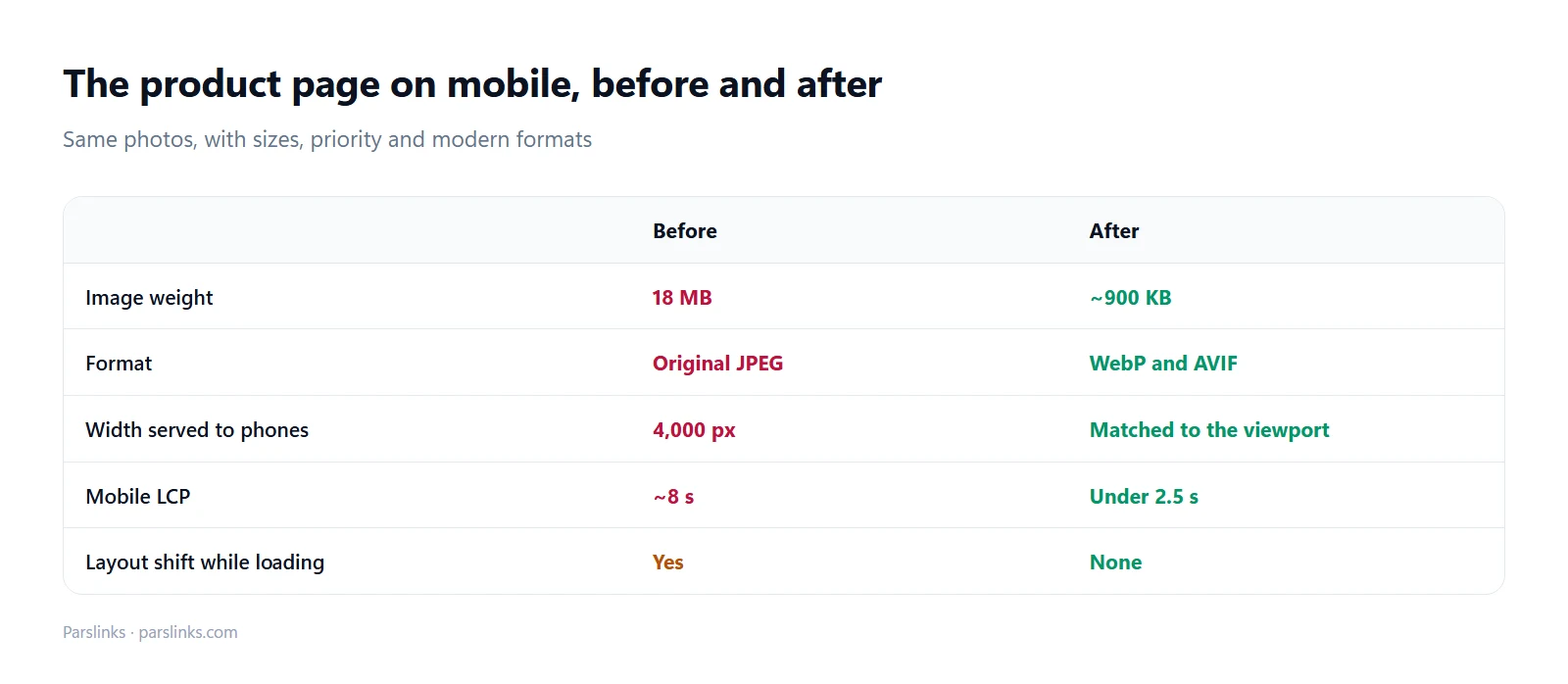
With proper sizes, priority only on the first photo and WebP plus AVIF, the product page's image weight on mobile went from 18 MB to about 900 KB. Mobile LCP dropped from eight seconds to under two and a half, and add-to-cart from phones rose noticeably.
If the page is still slow and images aren't to blame, start with our TTFB guide.
Frequently asked questions
Join the discussion
No comments yet. Be the first to share your thoughts.
Related posts
- Deploy
Deploying Next.js to production: what SSG, ISR and SSR each need from your infrastructure
Each page's rendering mode decides what your server has to do. This post covers what SSG, ISR, SSR and PPR need from your infrastructure, how standalone output works, and what breaks once the app runs on more than one instance.
- Guides
High TTFB in Next.js: finding the bottleneck, layer by layer
TTFB is the time from a user's request to the first byte of the response, and in Next.js it's made of network, middleware, data fetching and rendering. This post shows how to measure each layer separately and fix the most common culprits with code examples.
- Guides
Cache-Control headers for a modern front end: a recipe for every kind of file
Cache-Control is one header with a few words, but each word changes how browsers, CDNs and servers behave. This post explains each directive simply, suggests a safe recipe for every kind of response, and shows two costly mistakes.